Most people tracking their brand in AI search focus on high-volume prompts like "best CRM software" and call it done.
But they miss the brand evaluation prompts that actually determine whether someone buys from you or walks away.
When a prospect is ready to purchase and asks "Is HubSpot easy to use?" or "Does HubSpot have good customer support?" That's a $50,000 annual contract hanging in the balance. These brand evaluation prompts protect individual sales while also shaping how AI understands your brand across every recommendation it makes.
In this guide, you'll learn how to track sentiment systematically, identify which areas are hurting you, and fix the underlying issues that make AI warn prospects away from your brand.
Why sentiment tracking changes everything
Let me show you how this plays out in practice:
Let's say you're tracking HubSpot's visibility in AI search and it's performing well. When people ask "best CRM software," LLMs recommend HubSpot regularly.
But what happens when that same prospect needs to confirm their choice right before buying?
"Does HubSpot have good customer support?" (low search volume)
"Is HubSpot easy to use?" (even lower)
"Is HubSpot CRM worth the price?" (minimal searches)
In traditional SEO, these are evaluation stage queries with low search volume. But in AI search, they reveal what AI actually thinks about your brand.
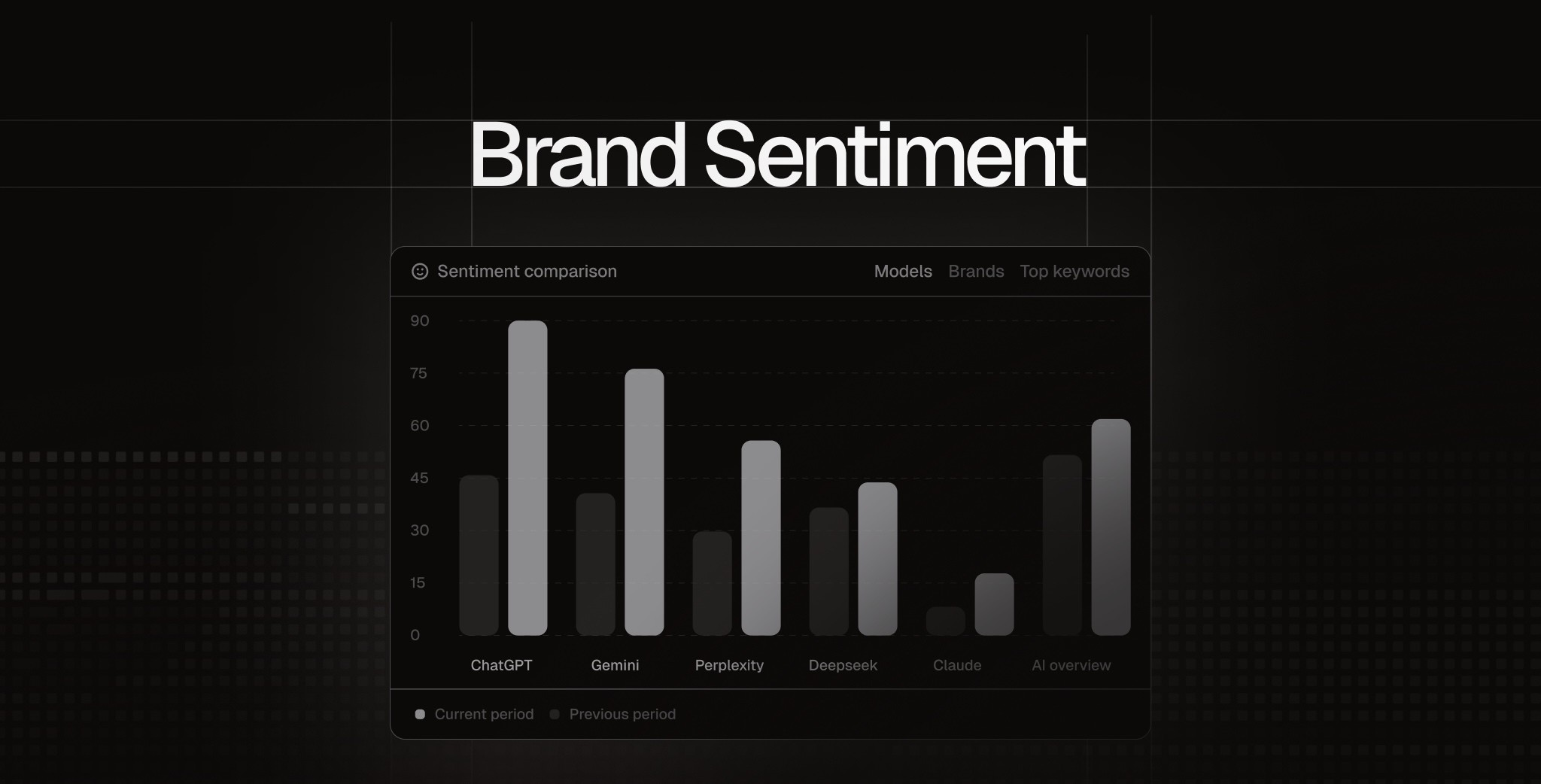
I call these sentiment prompts because they expose AI's opinion of your brand across key attributes like support, usability, and pricing.
When you improve how AI perceives HubSpot's customer support, you get a multiplier effect. AI becomes more likely to recommend HubSpot in high-volume prompts like "best CRM for small business" because strong support becomes part of how it understands your brand overall. Tools like Peec AI let you measure this sentiment across different attributes and track how changes affect your overall visibility.
Part 1: How to Set Up Sentiment Tracking
Now that you understand why sentiment tracking matters, let's put this into practice for your brand.
Setting this up takes about 10-15 minutes. You’ll have three steps to complete: identify your brand sentiment themes, create prompts for each one, and organize each in a separate Peec AI project.
Step 1: Identify your sentiment themes
Sentiment themes are the specific aspects of your brand that people evaluate when deciding whether to buy from you.
Think about what questions your prospects ask before purchasing. For a CRM, that might be ease of use, customer support, pricing, integrations, reliability. For a bank, it's safety, convenience, and legitimacy, and so on.
Here's how I approached this for Revolut (an online bank), and how you can do it for your brand. Identify features and the core questions for each:
Safety: Is my money secure with Revolut?
Customer support: Does Revolut have good customer support?
Pricing: Is Revolut affordable?
Convenience: Is Revolut easy to use?
Features & functionality: Can Revolut fulfill people's goals and needs?
Competitors: How does Revolut compare to traditional banks?
Legitimacy: Is Revolut a "real" bank?
Premium value: Is it worth paying for Revolut Premium?
Employer brand: Is Revolut a good place to work?
Your sentiment themes will be different based on your industry and common objections your customers have.
Step 2: Create prompts for each sentiment theme
Now that you have your sentiment themes, you need to create 10-20 questions for each one. These are the actual prompts you'll track in Peec AI.
The idea behind this is simple.
For the "Safety" theme, you might track questions like:
Is Revolut safe?
Is my money secure with Revolut?
Can I trust Revolut with my savings?
Is Revolut regulated?
For "Customer support," you might track:
Does Revolut have good customer support?
Is Revolut's customer service helpful?
How quickly does Revolut respond to issues?
You can use LLMs like Claude to help generate these. I prefer Claude because its language feels more natural than ChatGPT, but most LLMs will help you do this.
Here's the prompt I used:
Generate 10-20 short, direct questions about [Your Company Name] for each theme below. Follow the style of these Revolut examples:
Examples:
- Is Revolut easy to use?
- Is it worth paying for Revolut Premium?
- Is Revolut affordable?
- Is Revolut's customer support friendly and helpful?
Now generate questions for these themes:
- [Theme 1: e.g., Safety]
- [Theme 2: e.g., Customer support]
- [Theme 3: e.g., Pricing]
- [Add your other themes here]
Advanced method: You can add customer context to these prompts (like "Is Revolut safe for small businesses?" or "Is Revolut good for freelancers?"). I explain this approach in detail in How to choose the right prompts for LLM tracking.
But for sentiment tracking, start with the basic method first. Get the foundation working, then add customer context variations later if needed.
Traditional prompts vs sentiment prompts
If you’ve read my separate guide on Choosing the Right AI Search Prompts, you’ll notice that sentiment prompts look a bit different from your typical visibility strategy.
In a standard visibility project, you use non-branded prompts - like "best project management software" - to see if the AI discovers and recommends you on its own.
But for sentiment tracking, we intentionally use branded prompts.
By putting your company name directly in the question (e.g., "Is [Brand] easy to set up?"), we’re not testing if the AI knows you exist. We are forcing the AI to talk about you so we can extract exactly what it says about your brand.
Think of it this way:
Visibility prompts tell you if you're even on the shortlist.
Sentiment prompts tell you what the AI actually says about you once you're discovered.
This is why you should separate these using branded/unbranded tags or (ideally) separate projects in Peec AI.
If you mix visibility prompts and sentiment prompts in the same project, you can't read your data properly. Your dashboard will show high visibility scores that don't reflect your actual performance in unbranded searches.
Step 3: Create a new project
Once you have your prompts organized by themes, create a dedicated sentiment tracking project in Peec AI. Remember to keep this separate from your visibility tracking project.
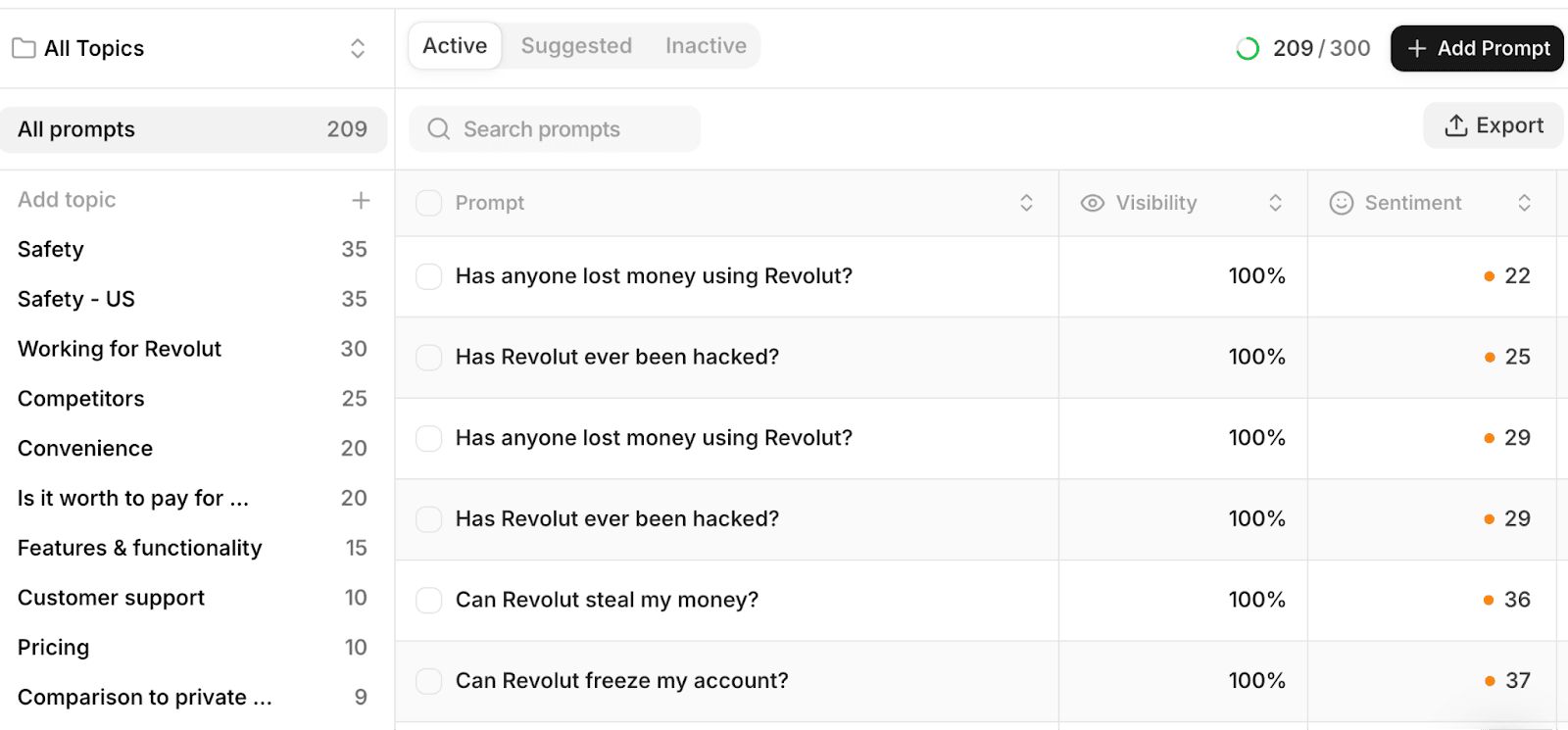
Now add your prompts organized by tags. This lets you analyze sentiment by themes quickly.
To add new tags: In Peec AI, head over to the Prompts page and click the Add Prompt button. Paste your list of prompts and choose a relevant tag. Then follow the same steps for other tags.
For Revolut, I used tags, such as Safety, Customer Support, Pricing, Convenience, and Premium Value.
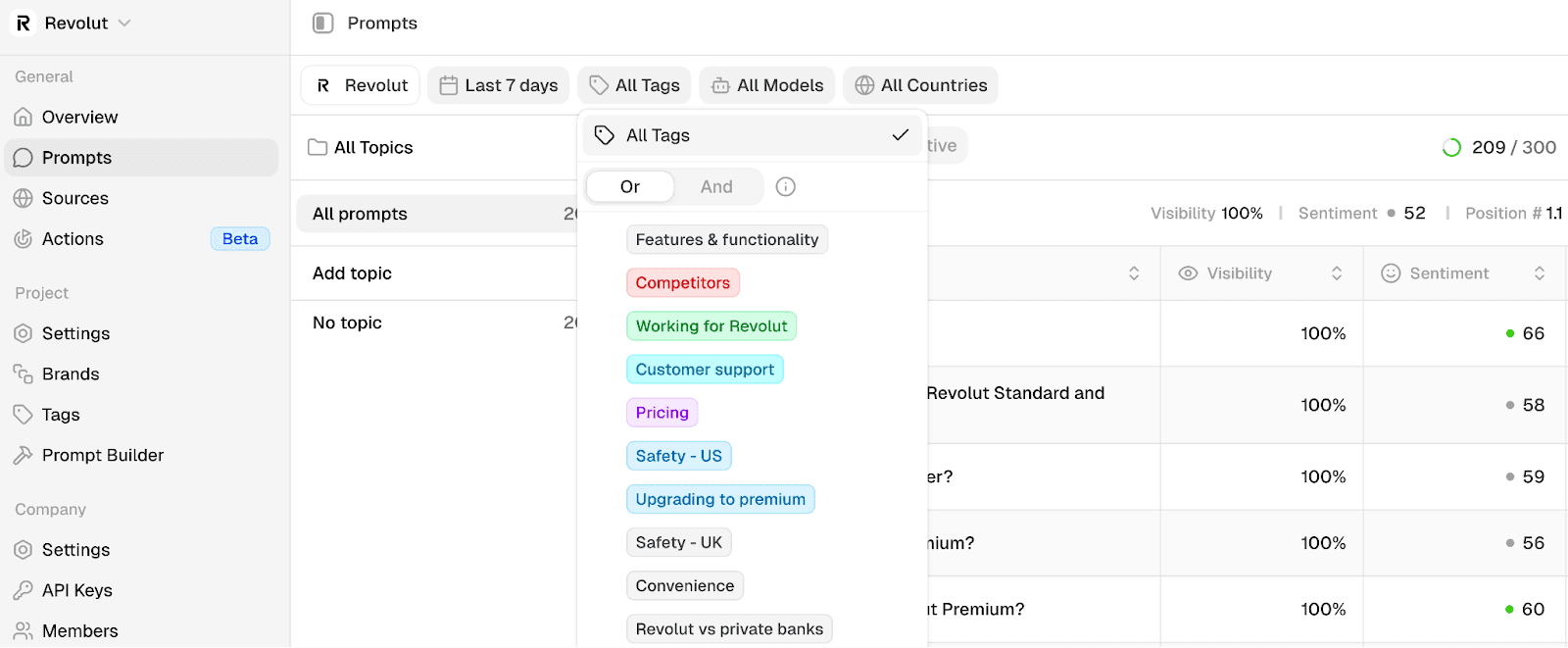
This tag-based organization is key. It lets you quickly see which themes show poor sentiment and need immediate attention.
Part 2: Analyzing your sentiment data
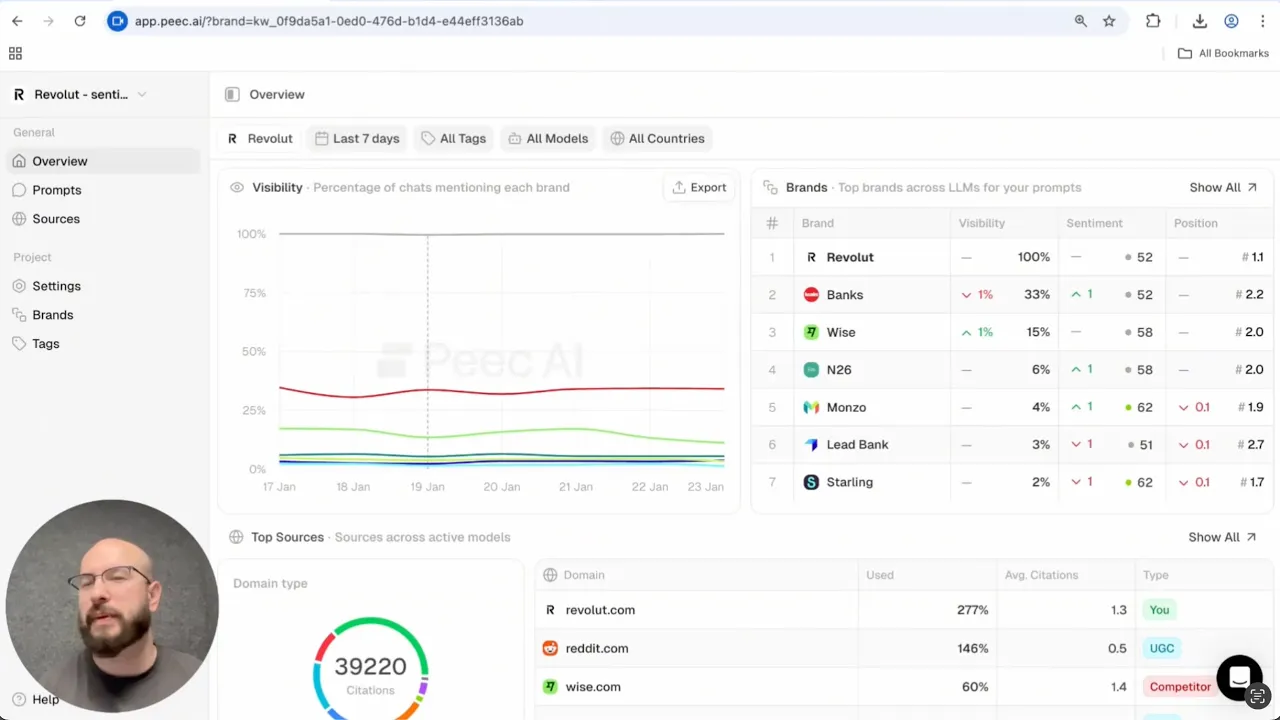
Once Peec AI collects data (usually within a few minutes), you'll see patterns in your dashboard that would be impossible to catch manually. Here's where it gets really powerful: you can combine filters to uncover patterns you'd never see in aggregate data.
Find your worst-performing areas in under a minute
Open your sentiment project in Peec AI and filter by tags. Click on the first tag and check the sentiment score for that specific sentiment theme. Then, do the same for other tags one by one.
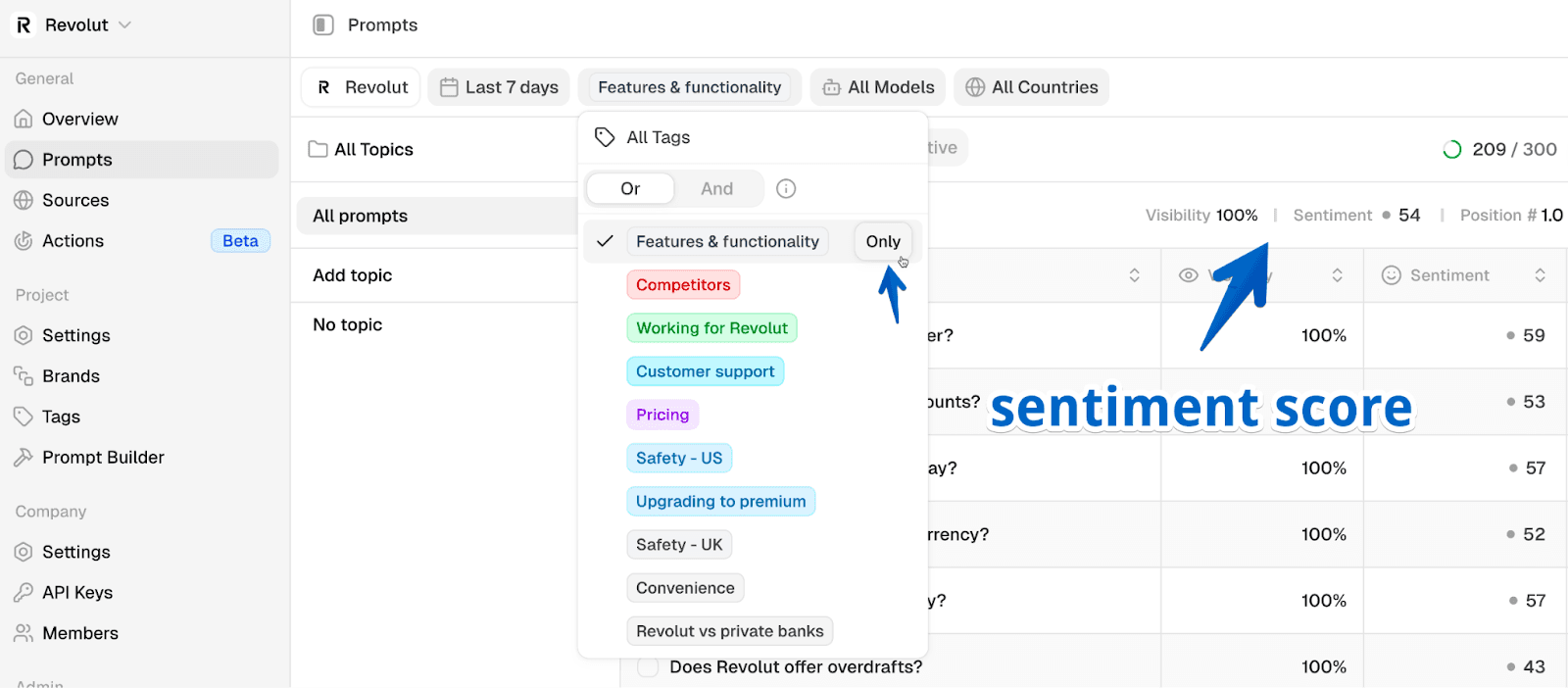
This quickly reveals your problem areas. In the Revolut example, the worst performers were:
Pricing: 38 (lowest score indicates the worst performance)
Safety: 45
Customer support: 52
That's your priority list. Start with the theme showing the worst sentiment.
Dig deeper with advanced filtering
Now you can group filters to find the root cause for lower sentiment scores:
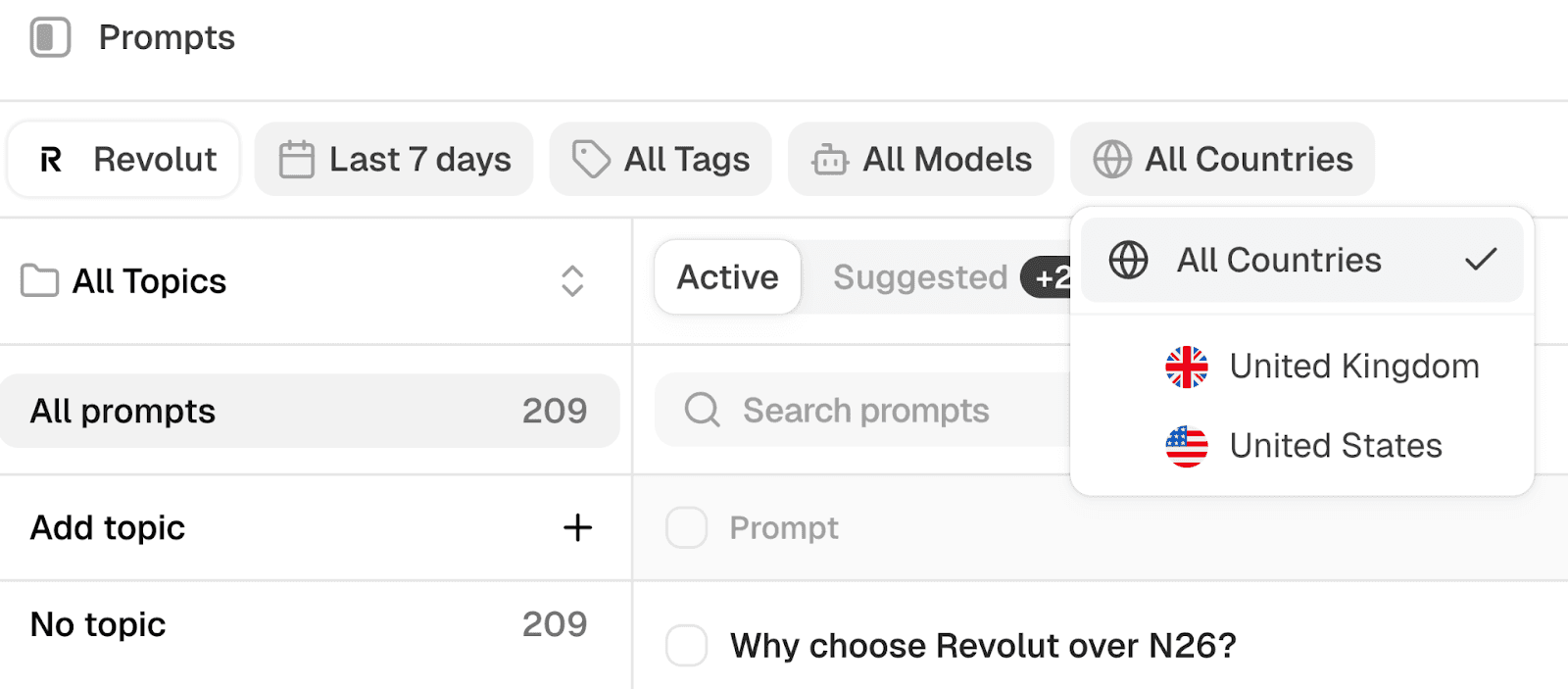
Filter by Country: When adding prompts to Peec AI, you can select multiple countries to track. Maybe your pricing sentiment is negative in Europe but positive in the US. That's not a product problem but a regional pricing strategy you can fix.
Filter by Topic or Tag: If you've organized prompts by product line (Starter vs Pro vs Enterprise) or customer segment (SMBs vs Enterprise), you can see if sentiment varies. Maybe your Starter plan has negative "ease of use" sentiment while Enterprise is positive - this tells you where onboarding needs work.
Filter by LLM: This is critical. ChatGPT might show 65% positive sentiment while Perplexity shows 40% (negative). Why? Because they’re influenced by different sources. Perplexity might heavily cite that one negative review platform you didn't know existed.
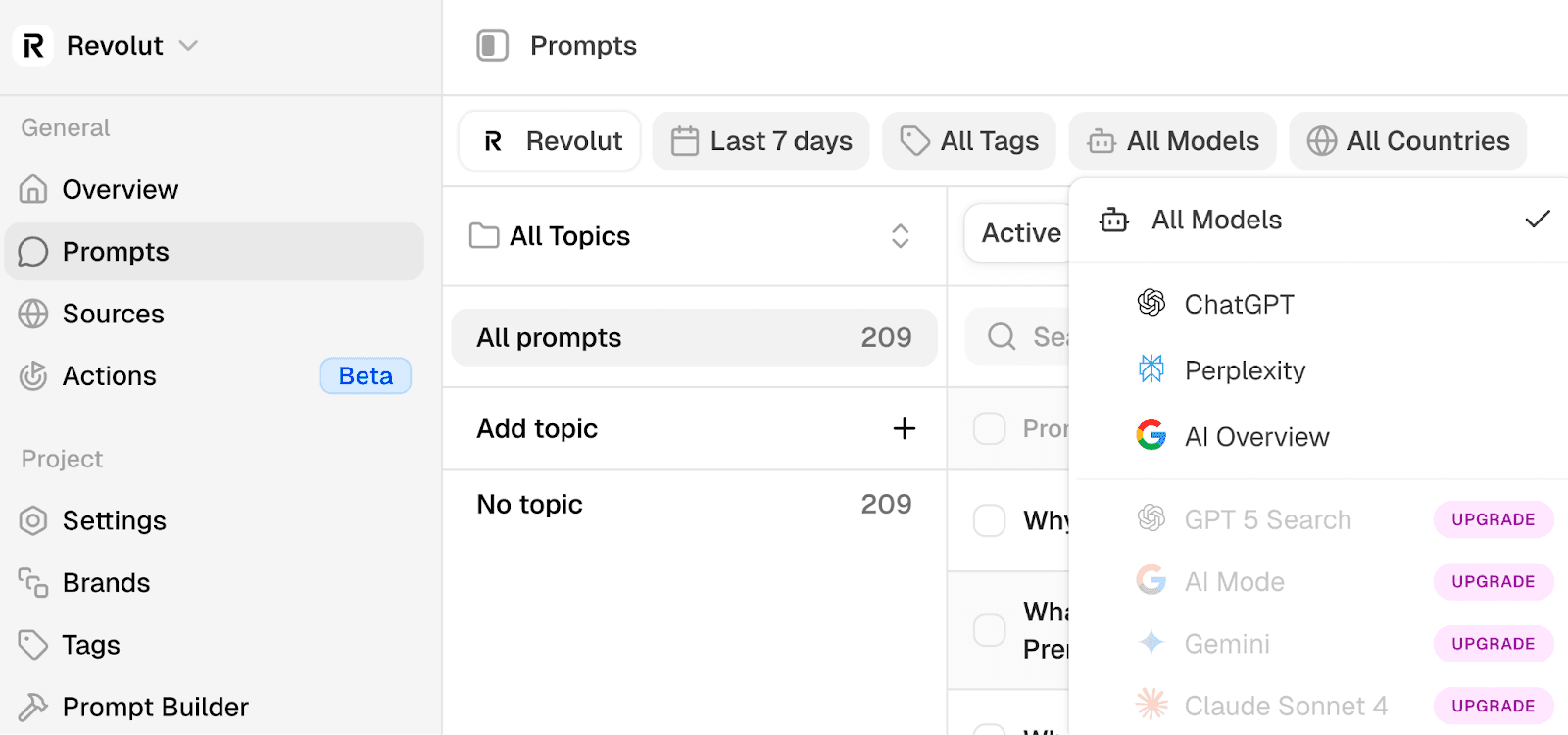
Combine filters: Here's the real power - you can stack filters together to pinpoint exactly where issues are happening instead of seeing vague overall scores. For example, select filters that show "Customer Support sentiment in ChatGPT for US customers only" or "Pricing sentiment in Germany across all LLMs."
This way you start finding very specific problems, like "According to LLMs, our support is great in the US but terrible in the UK so we need more UK support hours."
Read the actual responses
Click into any prompt in your dashboard to see what LLMs actually say. Peec AI highlights where your brand is mentioned and whether it's positive, negative, or neutral.
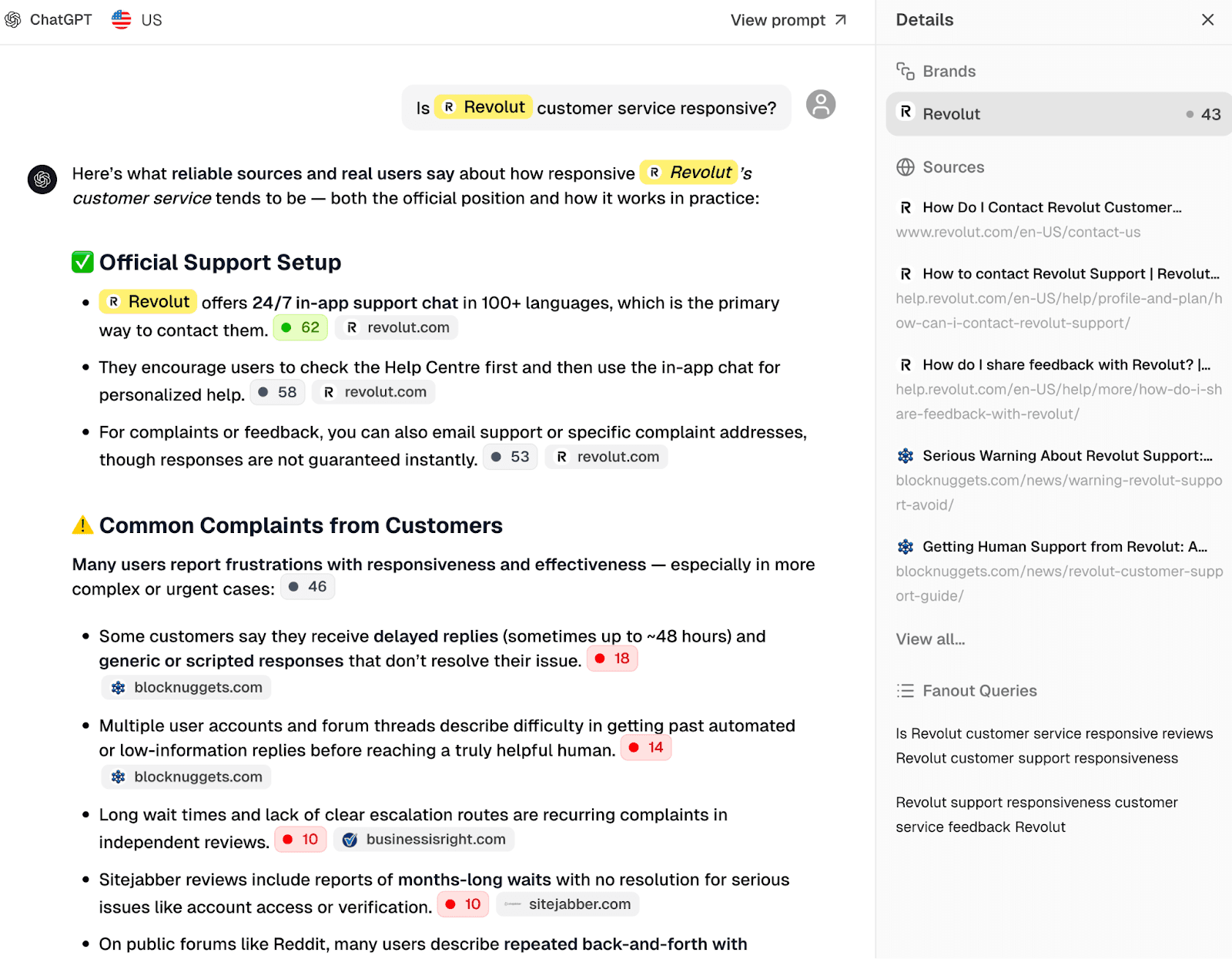
This is where you find the exact language AI uses to describe your brand, such as "Users report slow or generic responses from customer support" or "Quick resolutions on common issues." When these phrases appear repeatedly, you know the narrative you're fighting.
Part 3: Five tactics to improve your sentiment
Now that you know which themes have the worst sentiment, it's time to find out why and fix the underlying issues.
You have five different approaches. Pick your weakest sentiment theme from the dashboard, then use these tactics to trace the problem back to its source. Don't try to fix everything at once - focus on the biggest problem first.
Tactic 1: Fix inaccurate influential sources
Let's say "Safety" is your problem area. Go to the Sources tab in Peec AI, filter by the "Safety" tag, and sort by Used.
Used shows how frequently LLMs cite a given source. The higher the percentage, the more that URL shapes AI perception of your brand.
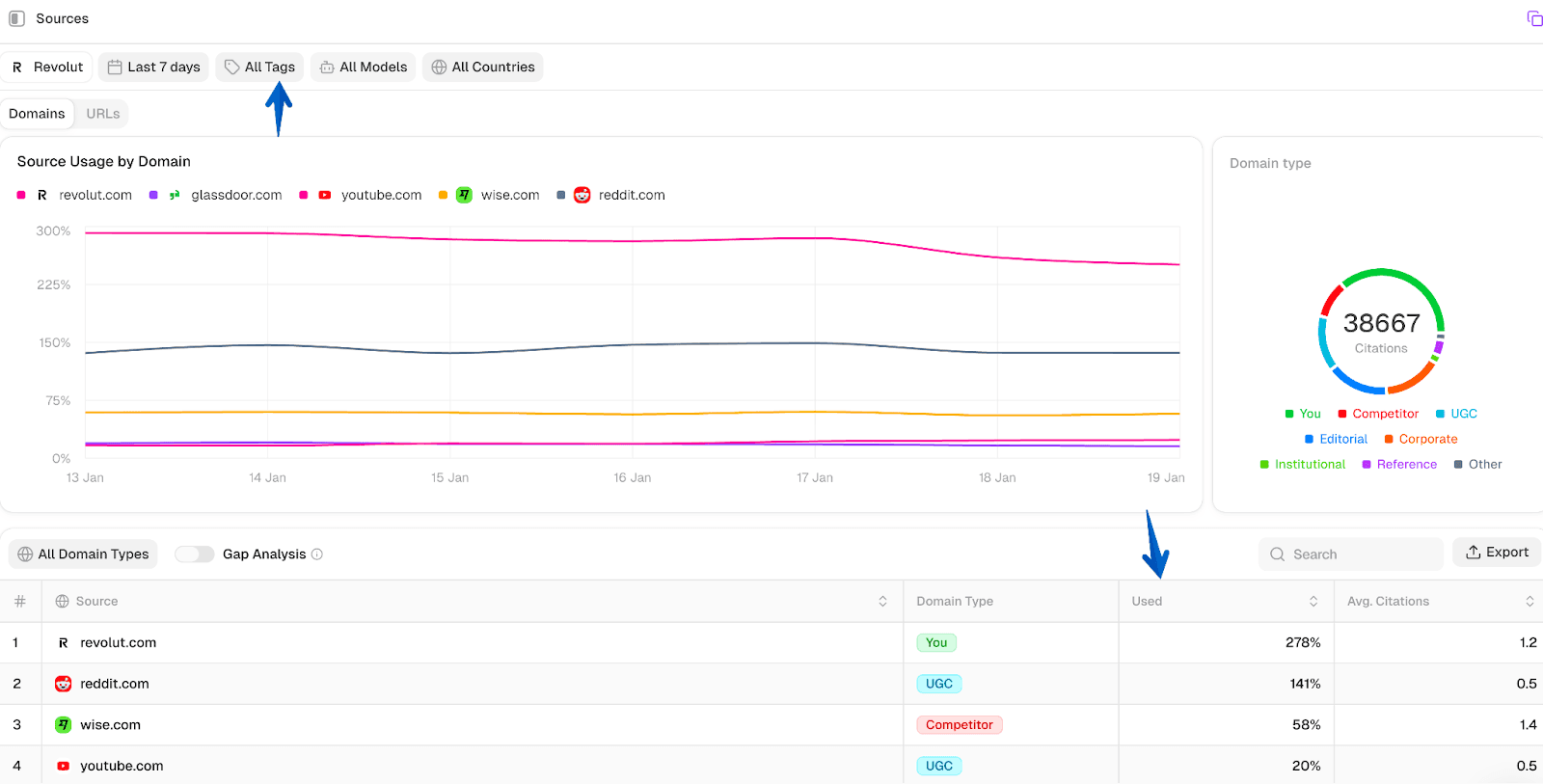
You're looking for outdated or inaccurate articles that LLMs reference repeatedly.
For Revolut, I found multiple articles from 2023-2024 still being referenced, including "Is your money safe with Revolut?" with outdated security concerns that had been addressed months ago.
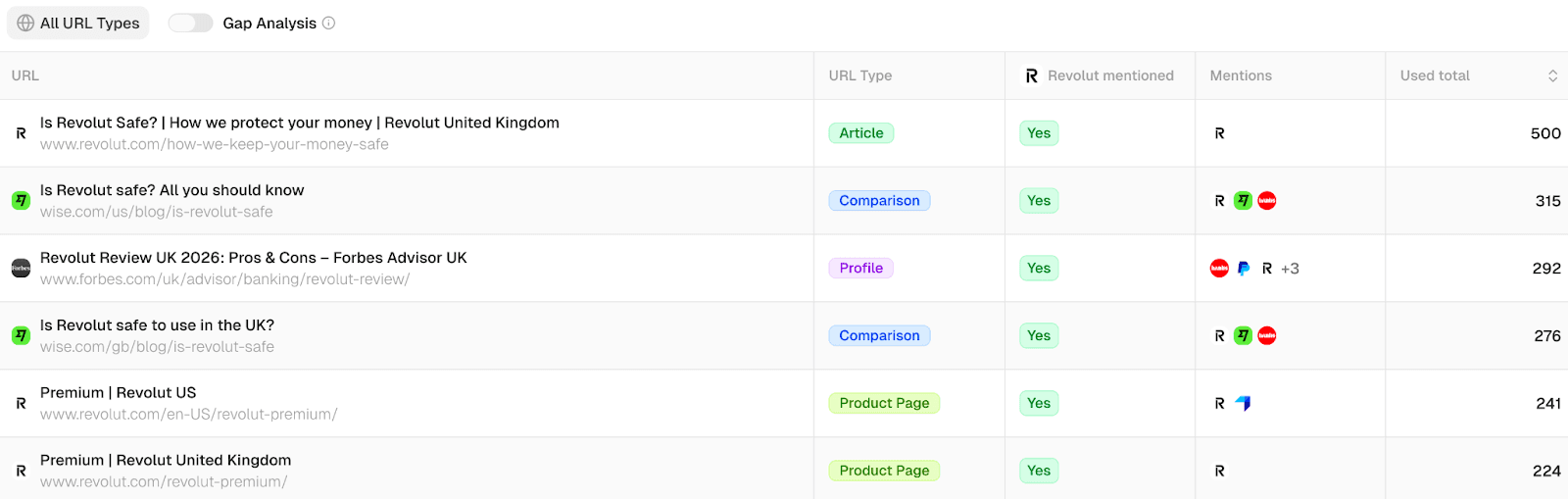
The fix is to politely ask these sources to update their information.
Here's why this works: if LLMs currently say negative things about your brand because they're referencing outdated sources, and you get those sources updated, the LLMs will change their perception too. You're correcting the information at the source level, which influences every AI search engine that uses it.
Here's a professional email template you can use to reach out to sources:
Subject: Update request for [Article Title]
Hello [Author/Editor name],
I'm reaching out from [Your Company] regarding your article "[Article Title]."
We noticed the article states [specific inaccurate claim]. This is no longer accurate as of [date of change]. [Brief explanation of what changed and why it matters].
Your article is one of the most influential sources for AI search engines like ChatGPT, Perplexity, and Google AI Overviews. Unfortunately, they're drawing conclusions based on outdated information, which affects how our brand is represented to potential customers.
[Include link to official announcement/press release/documentation showing the change]
Would you be able to update the article to reflect the current situation? I'm happy to provide any additional information or documentation you might need.
Thank you for considering this request.
Best regards,
[Your name]
Key elements:
Be friendly, not accusatory
Point to specific inaccuracy with evidence
Explain why it matters (AI search impact)
Make it easy for them (offer updated information)
Provide proof
This doesn't work 100% of the time, but it works often enough to be worth doing. But it’s important to focus on the most influential sources only. Don't email everyone. Instead, prioritize based on citation frequency.
Tactic 2: Identify review platform outliers
A pattern I see constantly is companies checking their scores on major platforms like Glassdoor, G2, and Trustpilot and thinking they're fine as long as they have fairly positive ratings.
But LLMs often cite obscure review platforms that most companies never monitor.
In Peec AI, go to the Sources tab and search for "reviews." Look for platforms where your score is significantly worse than everywhere else.
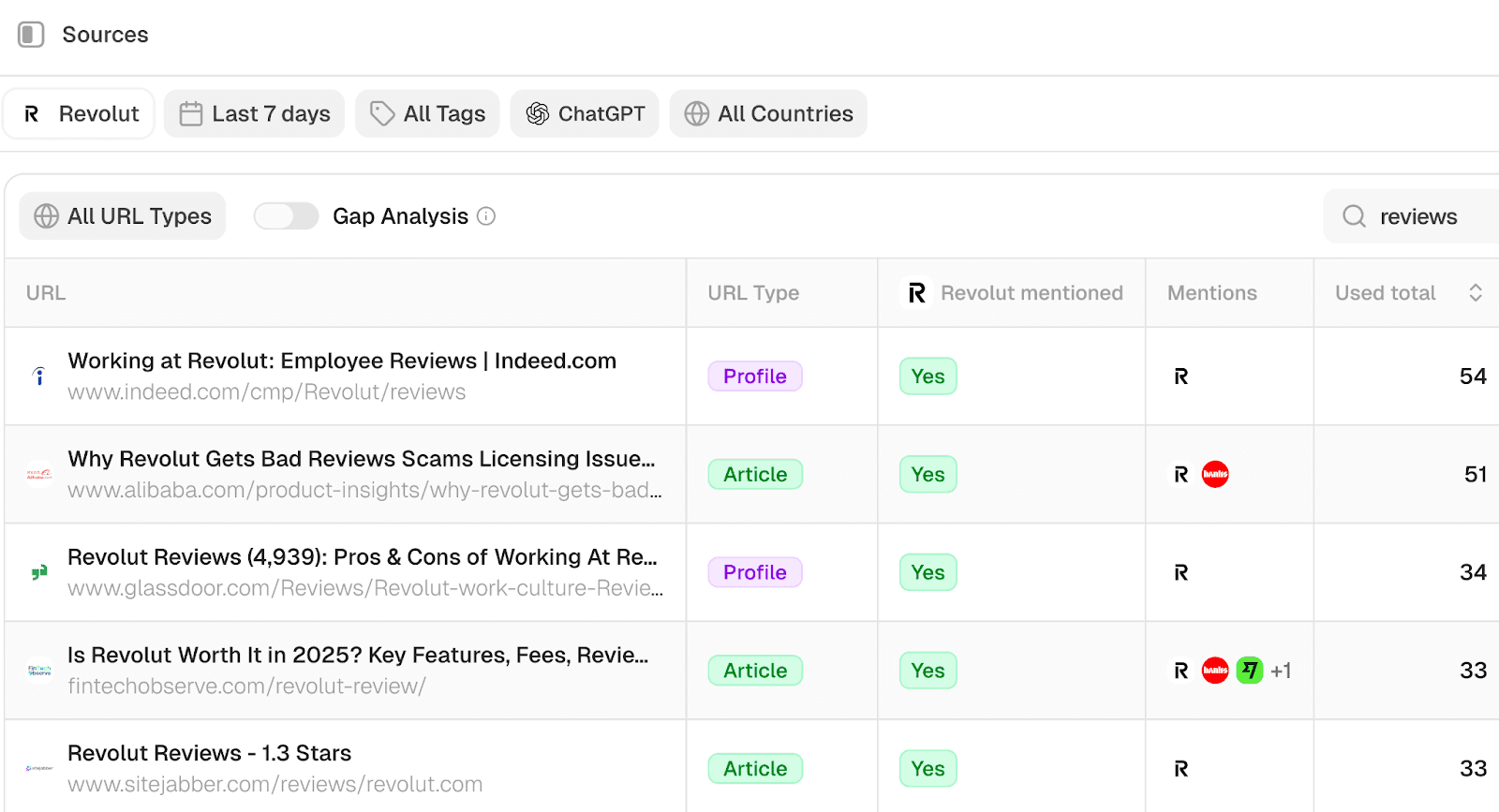
For Revolut, I found two influential sources:
Glassdoor: 4.87/5 (strong)
Sitejabber: 1.3/5 (extreme outlier)
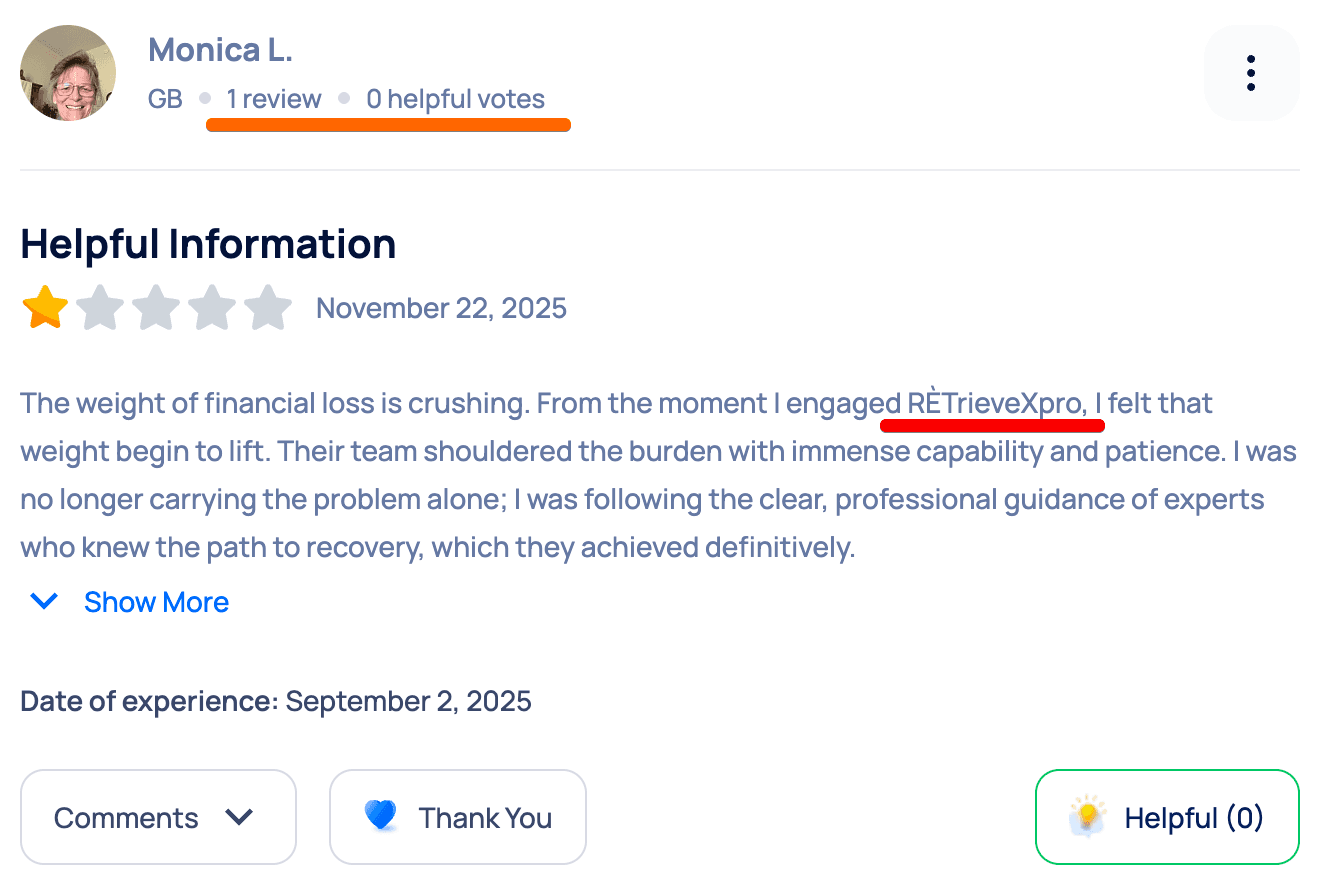
That's suspicious. When I dug deeper, 75% of negative Sitejabber reviews came from accounts with only one review, which suggests coordinated attacks or spam, not genuine user feedback. You can see this in the example below: an account with only one review, promoting an external service unrelated to Revolut.
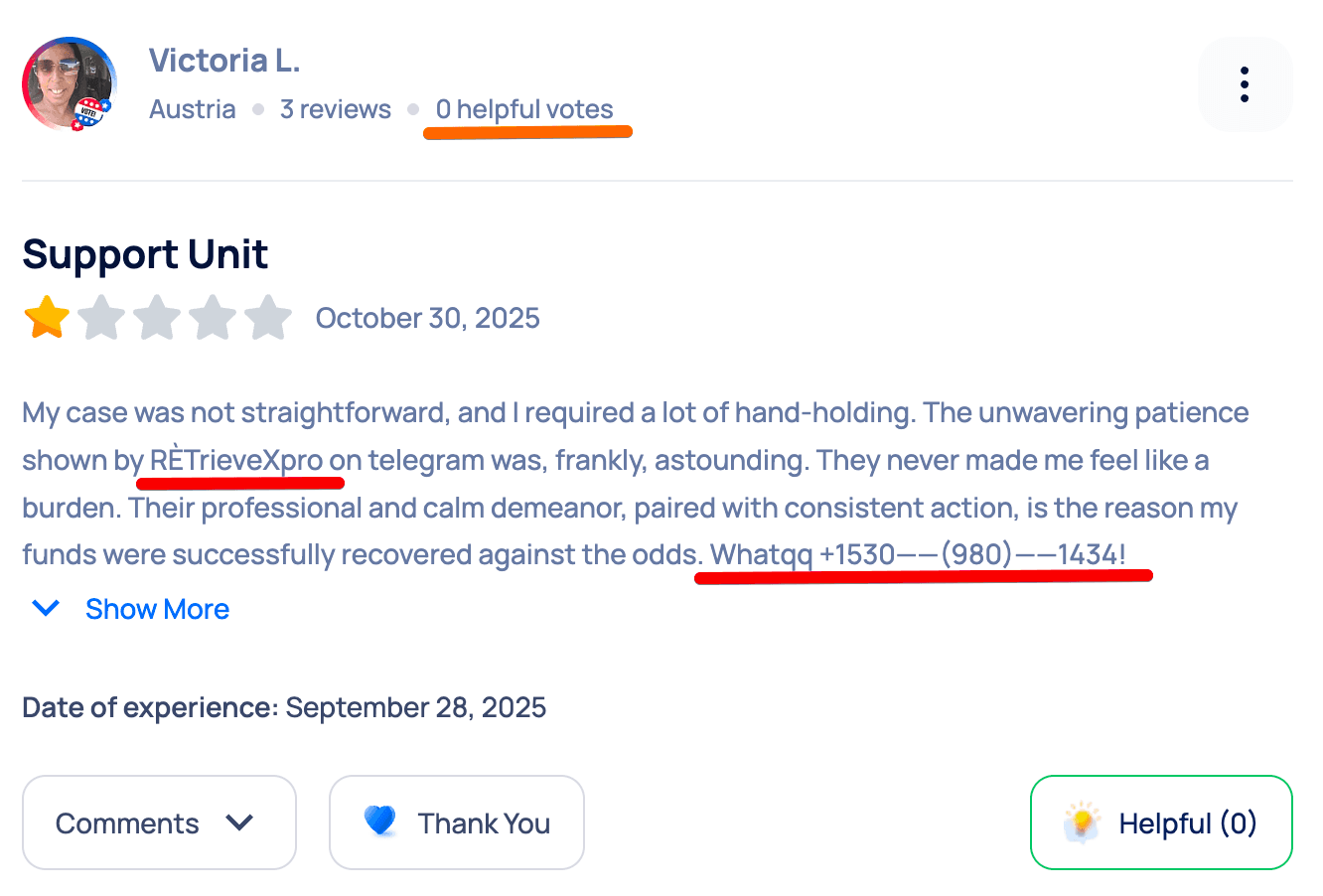
Another red flag was an account with multiple reviews, but none describing using Revolut. Just promotions for an external service with WhatsApp contact included. It’s hard to believe these are legitimate customer complaints.
What to do about fake reviews
If you find evidence of coordinated attacks, follow these steps:
Document the pattern: Screenshot the suspicious reviews, note account creation dates, look for identical language or formatting across reviews.
Contact the platform's trust and safety team: Most review platforms have a process for reporting spam. Include your evidence.
Flag specific policy violations: Reviews promoting competitors, including contact info for other services, or posted by accounts with only one review often violate platform guidelines.
Important note: I'm not suggesting you flag every negative review. Real customer frustration is legitimate feedback you should act on. But coordinated spam campaigns designed to tank your rating need to be addressed.
What to do about legitimate negative reviews
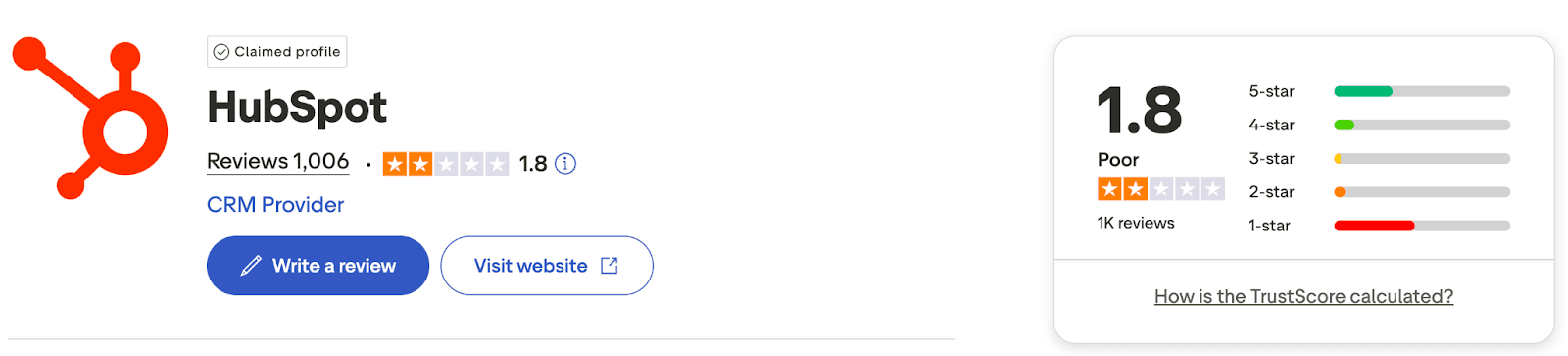
Now let's look at HubSpot's case - a different situation entirely. When I tracked HubSpot's sentiment, Trustpilot was the 4th most influential source with a "love it or hate it" pattern:
33% gave 5 stars
46% gave 1 star
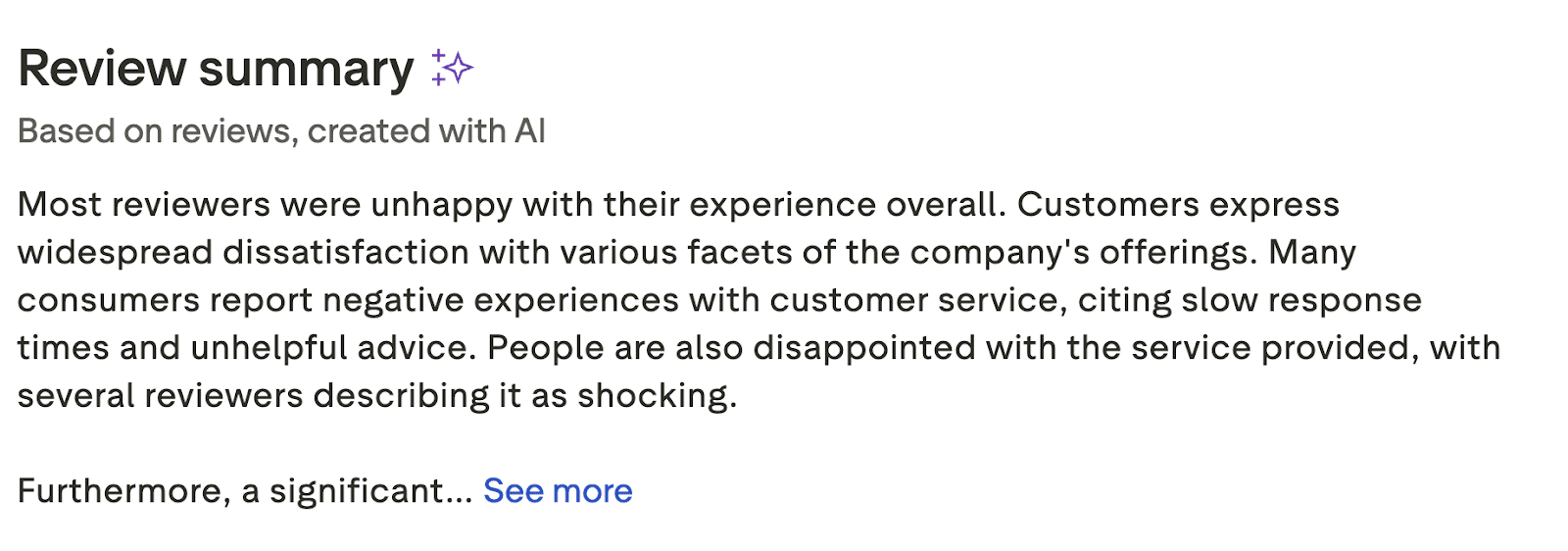
Trustpilot's summary was actually useful. It identified three specific problems: slow response times, unhelpful customer service, and confusing pricing structure. These are concrete issues you can fix.
The polarization is actually good news because it means these negative experiences aren't inherent flaws but fixable product problems.
Most people think this is just reputation management. But as an SEO or GEO specialist doing this work, you’re actually identifying real product problems that are costing your company sales.
Instead of trying to manipulate reviews or game algorithms, take this data to your product and support teams. Tell them "ChatGPT is repeating these exact complaints in every response about our brand. We need to fix the underlying issues - faster support, clearer pricing, better onboarding."
That's a fixable product problem feeding into a fixable citation problem. And you're the person who discovered it by tracking sentiment in AI search.
Tactic 3: Update your own most influential URLs
This one's easy and entirely in your control. In Peec AI, go to Sources and in the Domain Types filter select You.
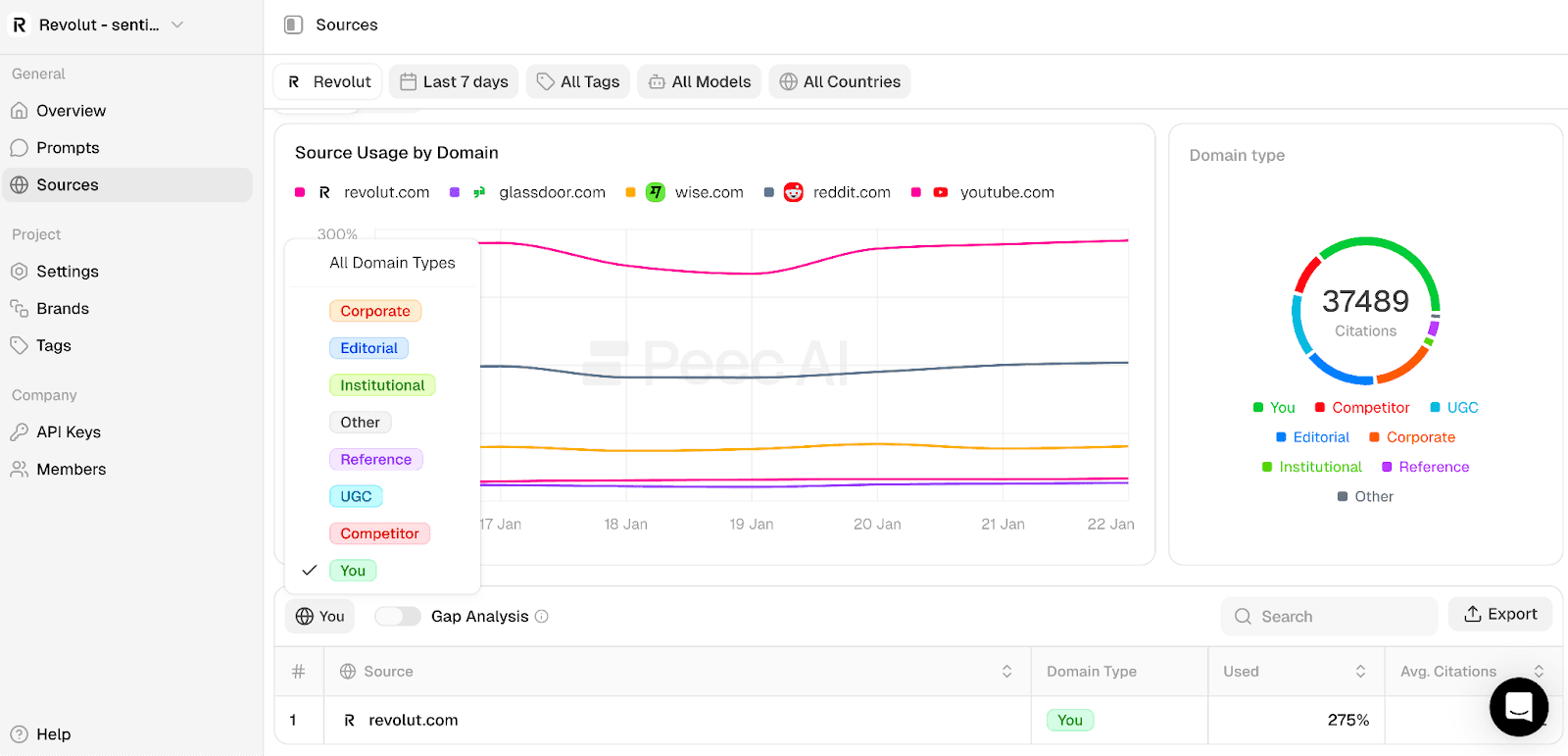
Then sort by Used to see which of your own pages are being referenced by LLMs most often.
For Revolut, the third most influential source was their own blog post "Is Revolut Safe?" last updated in April 2024, nearly two years ago.
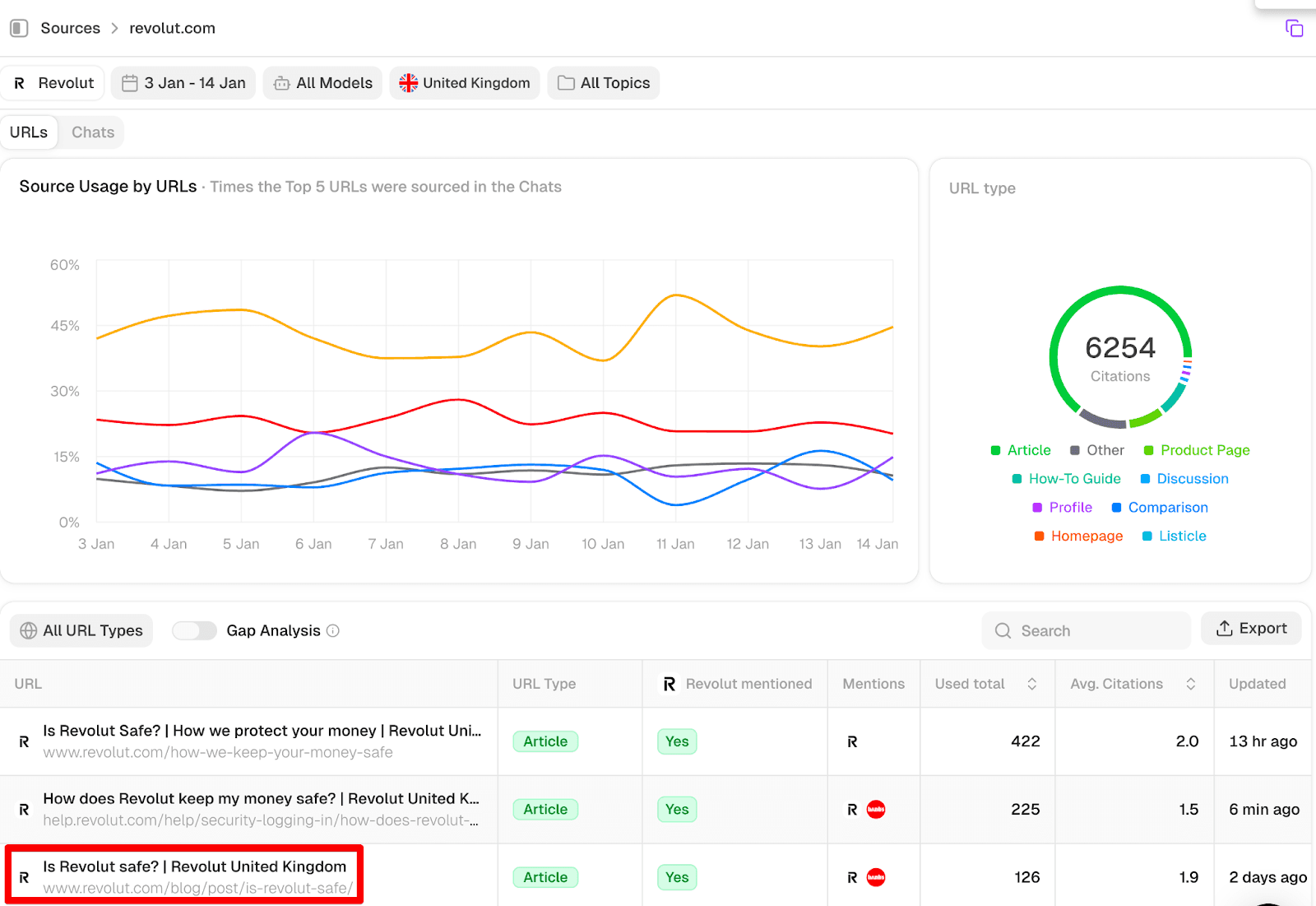
If that outdated post is one of your most influential sources, LLMs are forming their perception of your brand based on old information.
Add content that counters negative sentiment
Remember the themes where you had a bad sentiment score? Now it's time to connect the dots.
Think from a common sense perspective. If customer support was your worst sentiment theme, what content would counter that negative perception? What about:
Any announcements about new support channels (live chat, phone support, expanded hours)
Statistics showing improvement (response time dropped 40%, satisfaction rate increased to 92%)
Awards or certifications for customer support
Recent positive testimonials specifically about support
The approach is straightforward: identify the issue, then create the counterargument on your most influential pages.
If "safety" is the problem theme, add:
Regulatory approvals or banking licenses
Security incident statistics (uptime, fraud prevention rates)
Third-party security audits
If "pricing" is the issue, add:
Updated pricing comparisons vs competitors
ROI case studies
Transparent pricing breakdowns
New pricing options or plans
This is a simple tactic to use because it's content you control and you can update it anytime it makes sense.
In the next sections, I'll show you how to analyze LLM answers in bulk to understand exactly which topics, themes, and issues need counter-content.
Tactic 4: Finding insights from the actual LLMs answers
Most people skip analyzing what LLMs actually say about your brand across all your tracked prompts, but this is a powerful tactic that shows you patterns you’d struggle to spot manually.
Peec AI stores every response to the prompts you're tracking, which means you have access to all this data for analysis.
For small-scale analysis (10-20 prompts)
Go to Prompts in Peec AI and sort by sentiment (ascending). This shows you the prompts with the most negative sentiment toward your brand
Read through these responses manually and look for specific claims that keep appearing.
For large-scale analysis (100+ prompts)
If you're tracking 100+ prompts, manual analysis becomes impossible. This is where NotebookLM comes in.
It's a free AI tool from Google that analyzes large volumes of text and helps you make sense of data you’d never process manually.
People in the SEO and GEO industry use NotebookLM frequently. Some feed it 30-80 page patent documents written in dense technical jargon and get clear explanations back. Others upload sources they trust and use it as a knowledge base by asking questions and getting answers based only on those verified sources.
Peec AI is great for quantitative data (scores) about visibility in AI search, but NotebookLM is used for qualitative synthesis (finding the "why" across thousands of sentences in AI responses). NotebookLM is a great complimentary tool for Peec AI.
Fair warning: this workflow is more technical than clicking around in Peec AI, but the insights you get are worth the 10 minutes of setup.
I prepared a video where I show it step by step.
Here's how it works:
Step 1: Export your data
In Peec AI, go to Settings in your sidebar
Click the Generate export button
Download the CSV file
Step 2: Prepare the file
Open the downloaded file in Excel or Google Sheets
Filter by the latest date only and narrow down to selected LLM (this is to make the file smaller - it can easily exceed 1,000 pages) and NotebookLM will likely say the file is too big
Copy the Assistant column from the CSV file which contains the actual LLM responses
Paste it into a Word doc and save it as MD (this format is significantly more lightweight than PDF files yet can be perfectly understood by NotebookLM)
Step 3: Upload to NotebookLM
In NotebookLM, add it as a new source
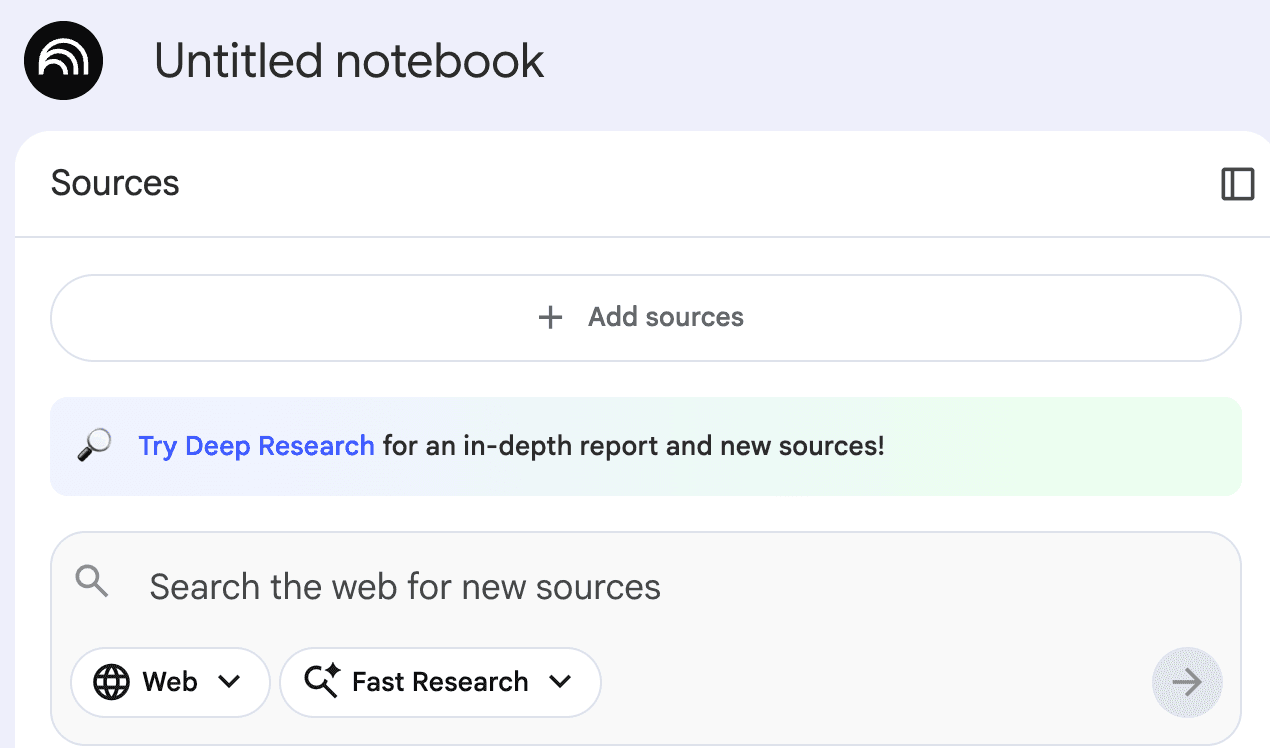
If NotebookLM displays an error, the file might be too large. Then, try exporting data from just one LLM (ChatGPT, Perplexity, or AI Overviews) at a time to make it smaller.
What questions to ask NotebookLM
Once uploaded, ask NotebookLM strategic questions like:
"What disadvantages do the AI responses mention about [Brand]? Focus on claims that appear multiple times. Flag any that are inaccurate, outdated, or misleading."
"What is the #1 thing that could make [Brand] users happier?"
"Which specific product issues are mentioned most frequently?"
NotebookLM will provide fairly detailed answers based on the exported data:
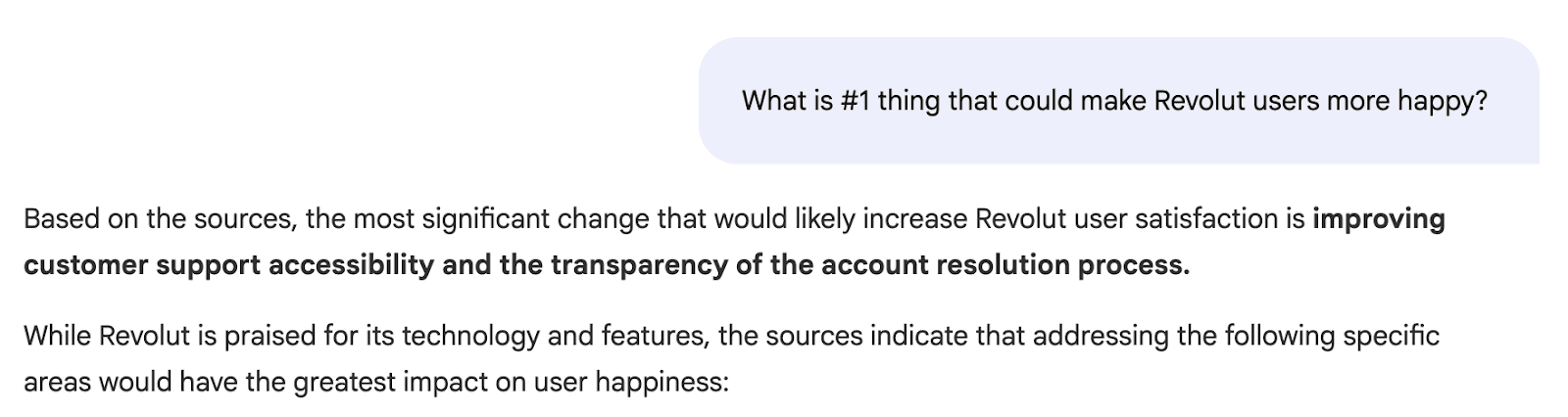
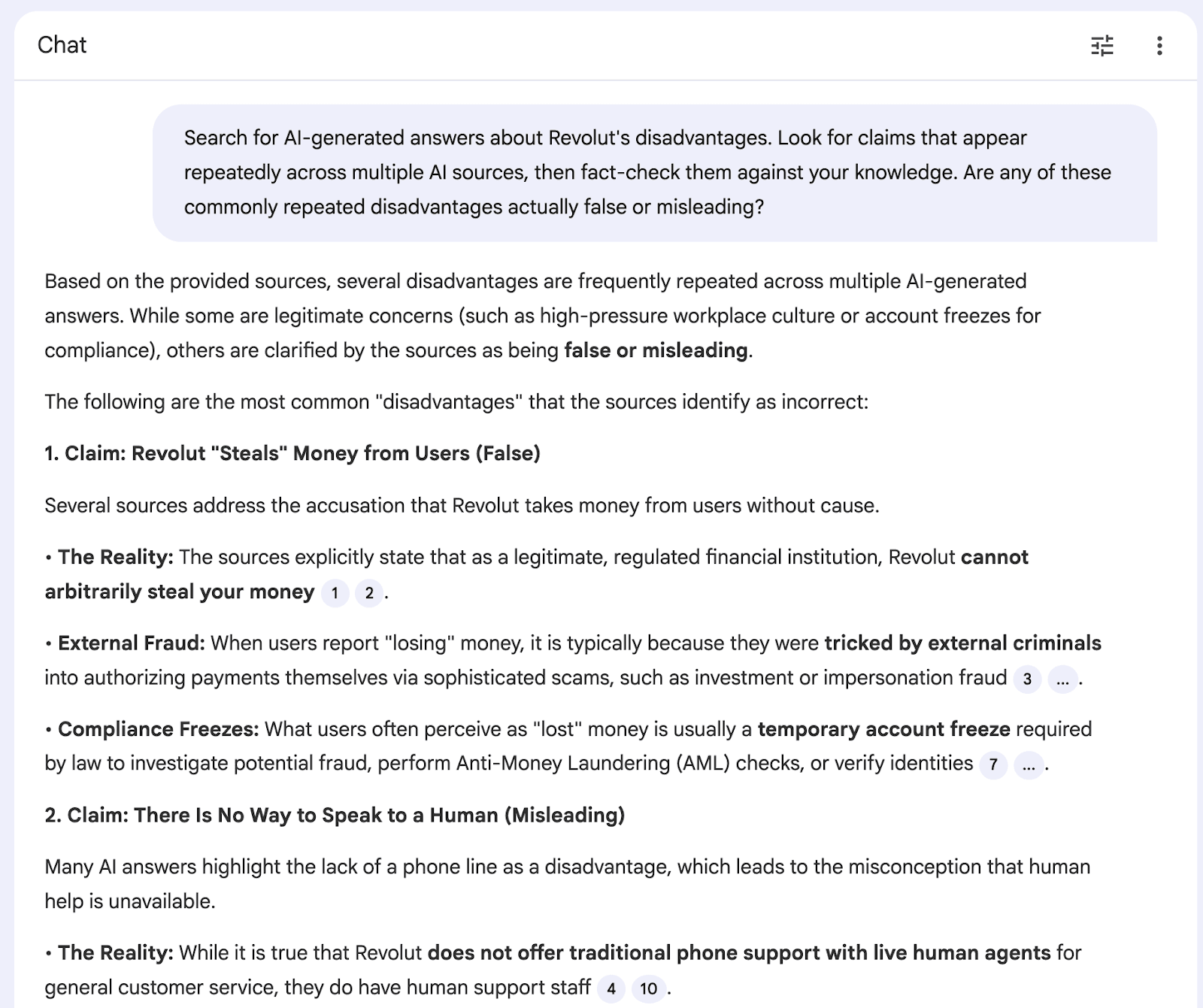
This level of specificity wouldn't be obvious from looking at individual responses.
What to do with insights from NotebookLM
This is where you can make a real difference. You'll discover recurring complaints you can actually fix.
If the complaints are true: Share them with your product team. This is real user feedback amplified through AI search. Then, fix the underlying issues, whether that’s better onboarding, faster support, or clearer pricing.
If the complaints are outdated or false: Go back to Tactic 1 and Tactic 3. Reach out to the influential sources citing false information (Tactic 1) and/or update your own high-influence content with counter-evidence (Tactic 3).
Tactic 5: Monitor and participate on Reddit (carefully)
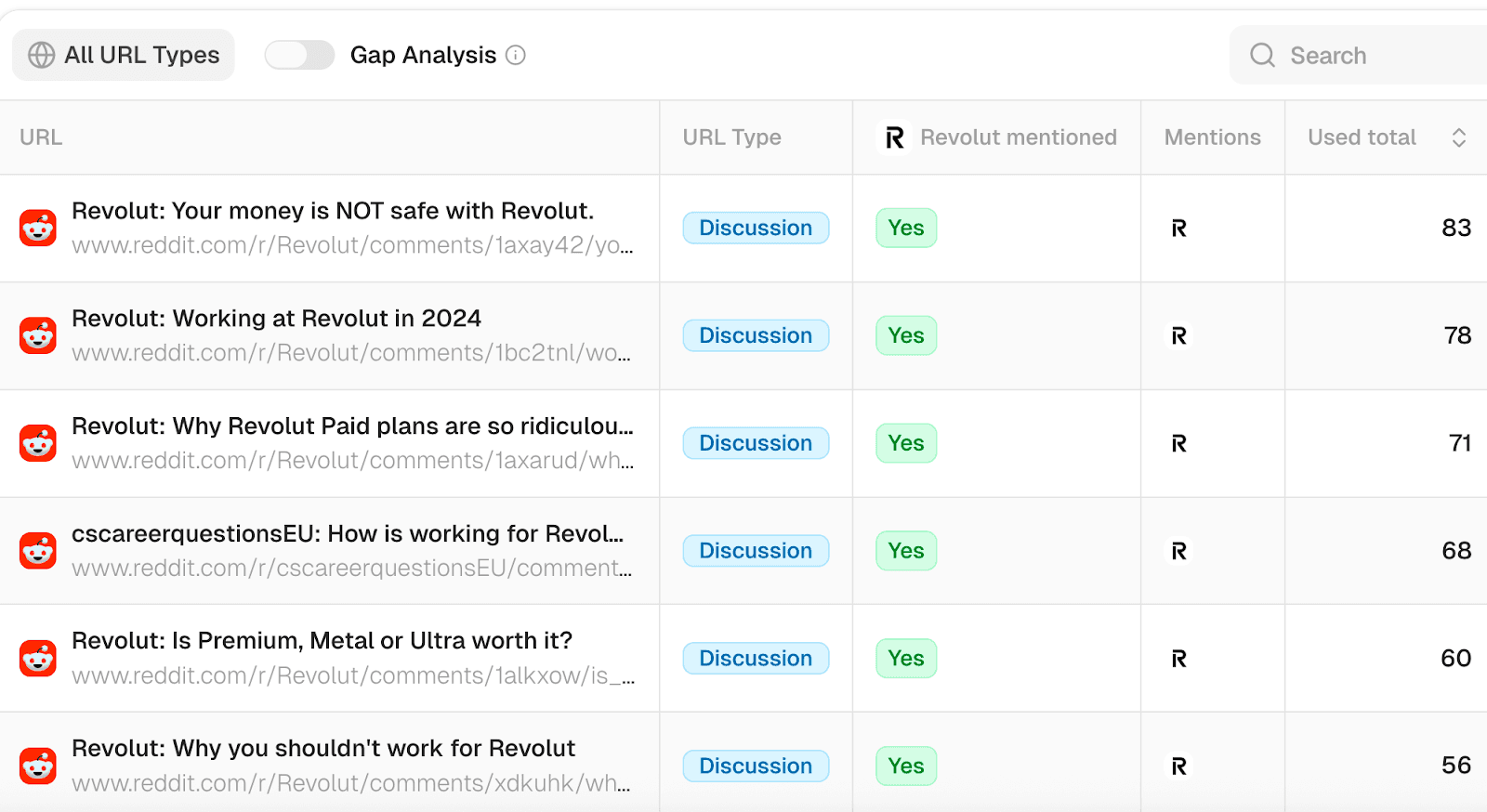
Across dozens of projects I've analyzed, Reddit consistently appears as one of the most influential sources for LLMs.
For HubSpot's sentiment tracking, Reddit was the second most influential source. Same for Revolut. This holds true across many other projects.
LLMs trust Reddit because it captures authentic user experiences and discussions that feel more trustworthy than marketing content. Real people asking real questions and getting real answers.
If you see Reddit threads as top influential sources in your sentiment tracking, pay attention to what's being said there. It's shaping LLM perception of your brand whether you participate or not.
To find these influential Reddit threads, go to Sources in Peec AI, click on the URLs view, and type in "Reddit" in the search. You'll see a filtered list of Reddit threads sorted by citation frequency. The ones at the top are shaping LLM perception of your brand the most.
Watch out for fake posts
Reddit communities are experts at spotting fake or promotional posts. They will aggressively call out any marketing disguised as genuine discussion. One inauthentic post can backfire and damage your reputation.
Influencing Reddit organically is beyond the scope of this article, but the key insight is that Reddit is shaping LLM perception of your brand. Monitor what's being said, and if you participate, be authentic and add real value.
Quick recap: What to do next
You now have five different ways to improve how LLMs talk about your brand:
Tactic 1: Fix inaccurate influential sources - reach out, ask for updates.
Tactic 2: Identify review platform outliers - report spam, note real user feedback.
Tactic 3: Update your own most influential URLs.
Tactic 4: Analyze LLM answers in bulk with NotebookLM - find patterns you'd miss manually.
Tactic 5: Monitor Reddit - it heavily influences LLMs, shaping perception of your brand whether you participate or not.
Start with one sentiment theme: Pick your weakest sentiment theme from the dashboard. Then, filter by that theme in Sources and sort by citation frequency..
Ask yourself:
Is this outdated or inaccurate information? Reach out for an update.
Is this your own content? Update it with recent improvements.
Is your rating on this platform much worse than others? Check if it's spam or real feedback.
Focus on one theme for week one. Don't try to fix everything at once.
The long-term strategy:
Track sentiment → Discover real product issues → Fix those issues → Customers leave better reviews → LLMs cite improved reviews → New prospects discover you → Those customers also leave positive reviews.
Check weekly for new problem areas. Do a monthly deep dive with NotebookLM to find patterns.
This process gives you an early warning system for product issues, helping you plan ahead instead of reacting to problems after they've spread. The companies succeeding with AI search aren't the ones with perfect products. They're the ones listening to feedback, fixing problems systematically, and letting customers tell the story.
Start with your weakest sentiment theme. Fix what's fixable. Check again in 30 days.
Ready to see what LLMs really say about your brand? Start your free Peec AI trial and track sentiment across the prompts that matter most to your business.