If your content only answers the literal question a user typed, you're missing a big portion of what the AI is actually looking for. When someone asks ChatGPT "what are the best project management tools?", it doesn't actually search for that phrase only. Behind the scenes, ChatGPT runs several different searches covering comparisons, reviews, specific brands, and the current year, then blends the results into one answer.
Those hidden searches are called query fanouts, and they're arguably the most important SEO signal very few are optimizing for.
I analyzed 5 million query fanouts collected between April 1 and April 21, 2026 across ChatGPT, Perplexity, and Grok to understand exactly what these models search for behind the scenes: which words they inject, which sources they trust, and how their strategies differ. Most of these fanouts come from ChatGPT (the most popular of the three), so unless I note otherwise, the findings refer to ChatGPT.
In this article, I break down what fanouts actually do, why "best of" listicles keep winning, which review sites quietly shape how AI describes your brand, and how to find the exact fanouts firing on your own prompts.
TL;DR
Query fanouts matter because of how AI ranks sources. ChatGPT uses Reciprocal Rank Fusion algorithm, meaning that content that appears across multiple fanout searches scores higher than content that only surfaces for one. Knowing the fanouts tells you exactly which angles to cover.
"Best" is the word ChatGPT most often adds to its hidden fanout searches, even when the original prompt didn't include it. This is why listicles ("10 Best...", "Top 7...") dominate AI search results. Other top injected words include: top, comparison, reviews, tools, software, features.
ChatGPT secretly searches for reviews, even if you didn’t ask for it. If you sell a product, reviews on Glassdoor, G2, Sitejabber, etc., directly shape how AI describes your brand.
The three models behave very differently:
Perplexity (1.4 fanouts/prompt): Typically just simplifies your query. Least useful signal if you want to optimize your content for visibility in AI search.
ChatGPT (2.1 fanouts/prompt): Adds brands, comparisons, and reviews.
Grok (6.8 fanouts/prompt): Runs a full research brief, narrowing it by year, brands, and specific trusted sites (Reddit, Wirecutter, ConsumerReports, G2).
What are query fanouts?
Query fanouts are the extra searches an AI search engine performs behind the scenes to find online sources to increase accuracy of the answer.
Think of it like asking a friend "what's a good restaurant?" Instead of giving you a quick answer, they’ll likely think: Good for what? A date? Family dinner? Cheap eats? Italian? Nearby? Then, they’ll give you an answer that covers those angles.
AI search does the same thing. If you just typed "best headphones," the AI secretly asks itself follow-up questions, like:
Best headphones this year?
Best wireless ones?
Best for blocking noise on a plane?
Best for listening to music?
Best cheap ones?
Best over-the-ear style?
Then an AI search engine runs all those searches at once, gathers the results, and mixes them into one answer for you. That's a "fanout", meaning your one question fans out into many.
Similarly, when you ask for “best smartphones,” AI search engines will search for best smartphones in 2026, look for comparison of flagship phones, and other queries like in the screenshot below:
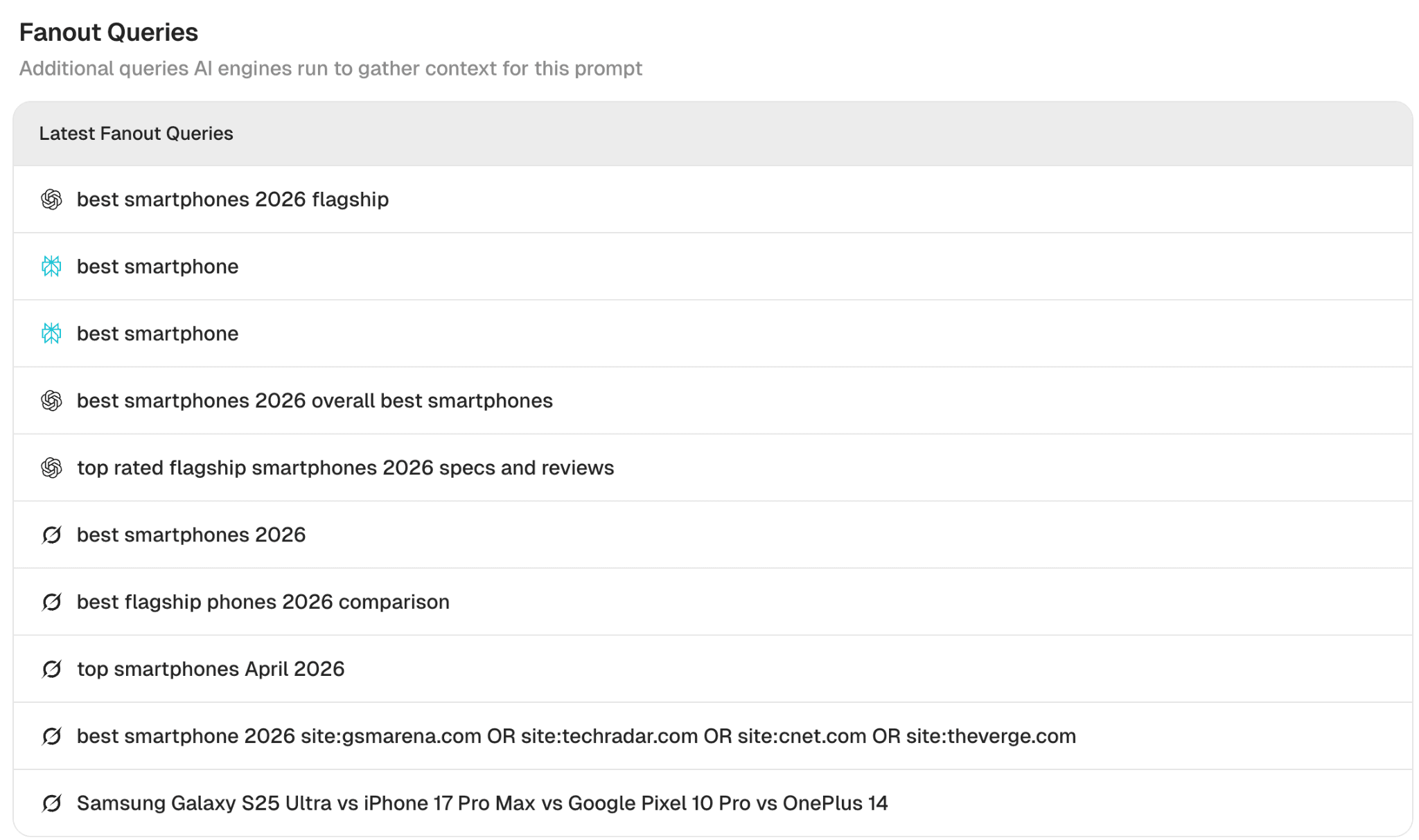
Source: Peec AI, fanouts generated for initial query: “best smartphones.”
Why you should care about query fanouts
Query fanouts give you a large amount of data about topics and angles that matter most to AI search engines. Metehan Yesilyurt discovered that ChatGPT uses Reciprocal Rank Fusion (RRF), an algorithm that combines scores across multiple subqueries. In other words, all things being equal, content that answers only one subquery has lower chances of inclusion in AI search results.
Once you know which angles the query fanouts are pulling from, you can optimize accordingly. For example, if large language model (LLM) fanouts are searching for both premium and budget options, your comparison article on a tech review site should cover both, not just one.
If you are a car dealership and someone is looking for the best electric car for a family and you know that fanouts consider factors like reviews, range, performance, you could include this information on your page to increase the chances of being selected by an LLM.
Top 10 words added by ChatGPT
Now that we know why optimizing for query fanouts matters, we can look at which words fanouts add most often, even when those words don’t appear in the original query. This reveals how ChatGPT "secretly" reshapes the meaning and intent behind what the user actually asked.
Below, you can see the list of the most popular words added:
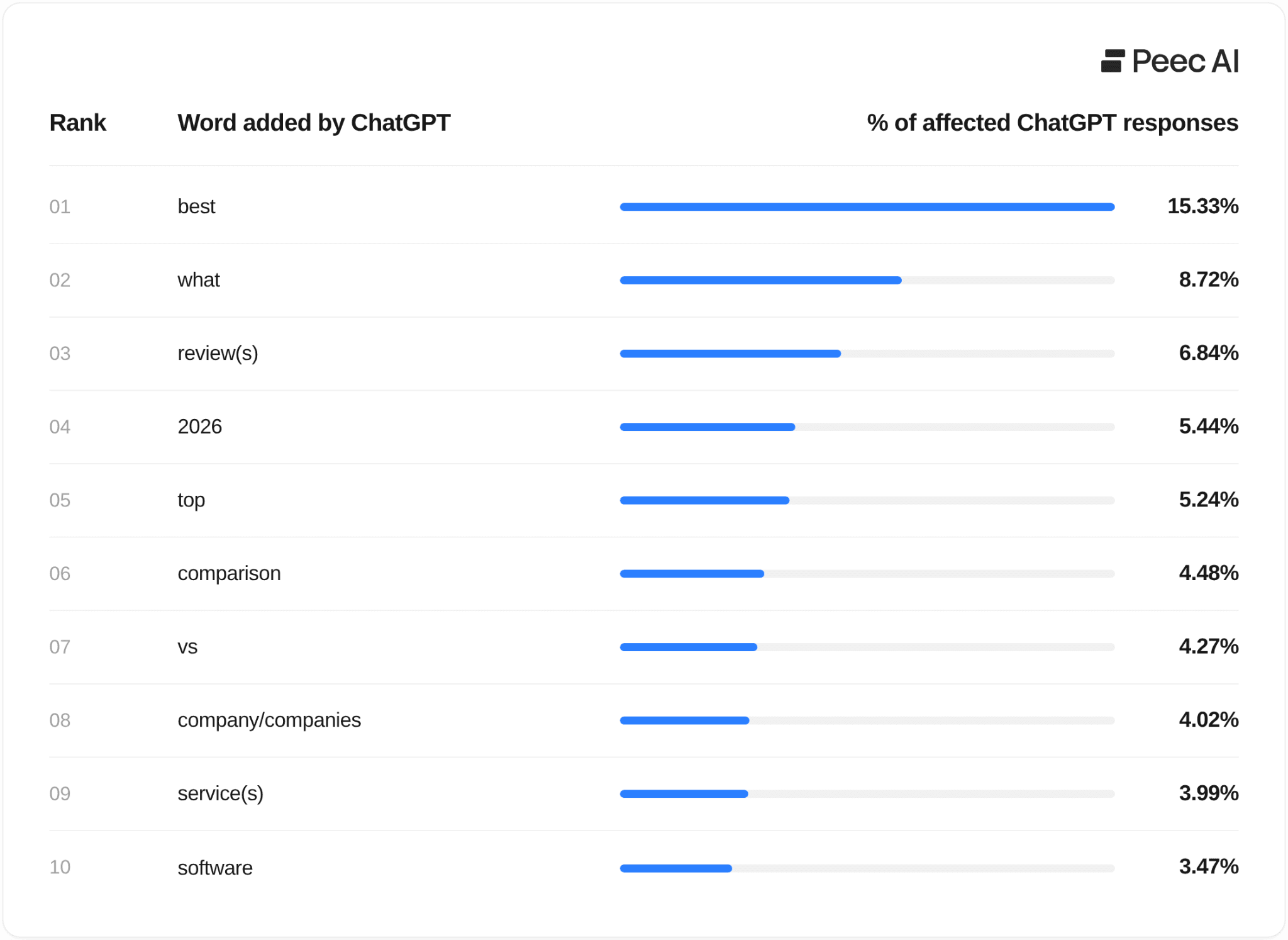
Source: Peec AI query fanout data (April 1–21, 2026)
The top words that fanouts tend to add include: best, top, comparison, reviews, tools, software, features.
Whenever someone asks for advice, a recommendation, or a comparison in your category, ChatGPT is likely reframing it as a "best of" search, regardless of what you sell. The implication for content is the same: you can consider positioning yourself around "best for [specific need]" rather than just describing what you offer.
The #1 word ChatGPT secretly adds to your searches: "Best"
Listicles consistently show up as top sources in AI search results, and the query fanout data finally explains why.
"Best" is the word query fanouts inject most often. When you ask AI for advice or a recommendation, it often reframes your question into a "best of" search behind the scenes.
Listicles are built around exactly that word ("10 Best...", "Top 7..."), so they're naturally positioned to match the questions AI is really asking.
A few examples when ChatGPT injects “best” even if the user didn’t use this word:
"Which Samsung Galaxy should I get?" becomes → best Samsung Galaxy phones comparison 2026
"How do I onboard a marketing team to Jira?" becomes → Jira onboarding best practices
"Where can I find job candidates outside LinkedIn?" becomes → best tech recruiting platforms, alternatives to LinkedIn
"What are the leading companies offering SEO solutions?" becomes → best SEO agencies / top SEO tools
How often does this happen? For advice-style questions, like "Should I use X?" or "Do you recommend Y?" it shows up in 24.3% of fanouts, so that’s almost every fourth answer!
What triggers the inclusion of “Best of” by ChatGPT?
I wanted to find out what patterns of prompts trigger adding “best of” by ChatGPT. So I looked at the 4-grams (four-word phrases that appeared most often across the initial prompts) to see which query patterns trigger this behavior.
Here are the common themes I found:
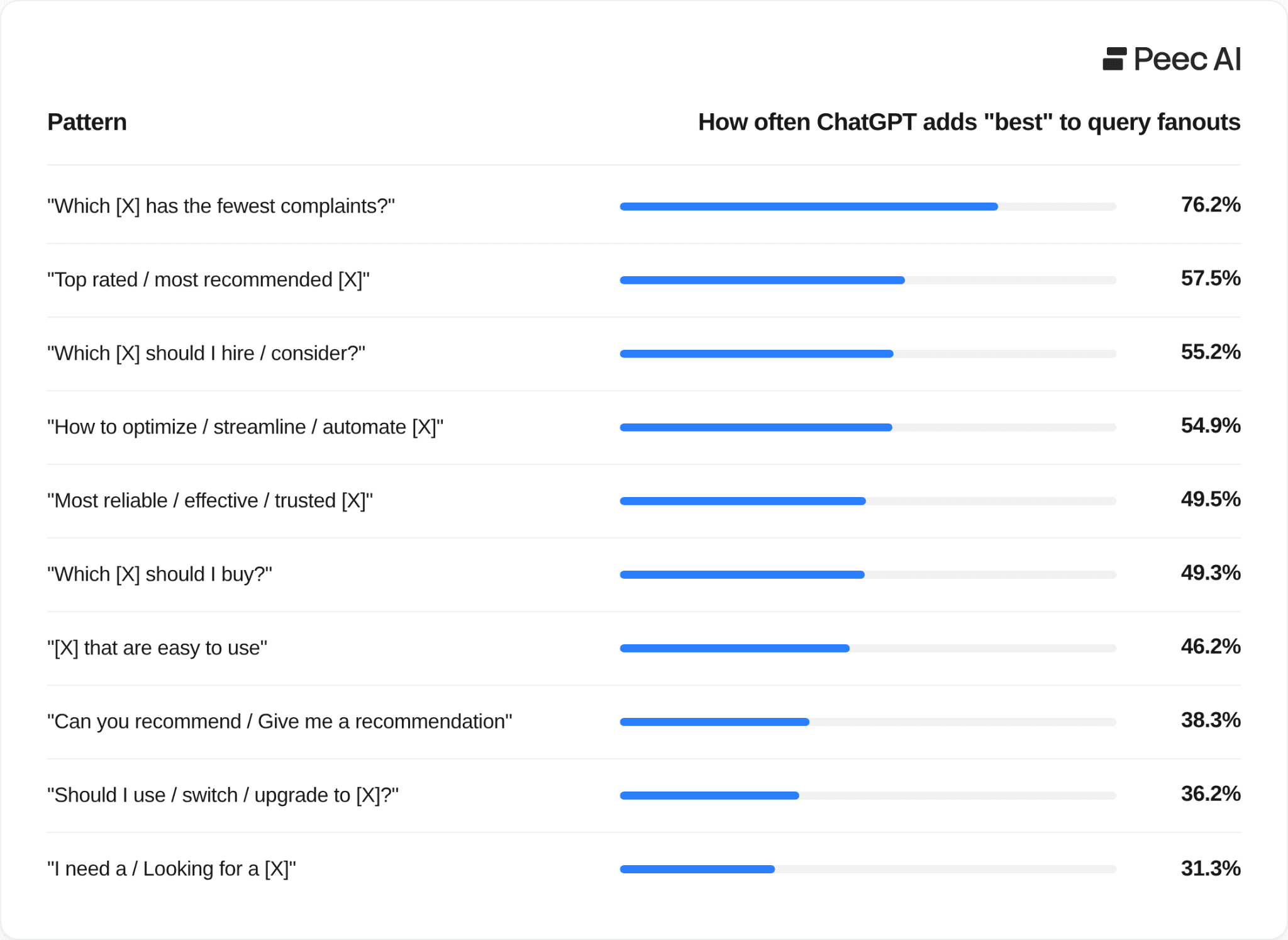
Source: Peec AI query fanout data (April 1–21, 2026)
“Reviews” is the third most injected word by ChatGPT
ChatGPT looks for reviews even when you never ask for them, by tacking "reviews" onto its internal searches regardless of how the original question was framed.
Ask "what are the best tools for X?" and behind the scenes, AI search pulls review content to answer you.
Ask "which is better?" and it'll likely go searching for reviews, too.
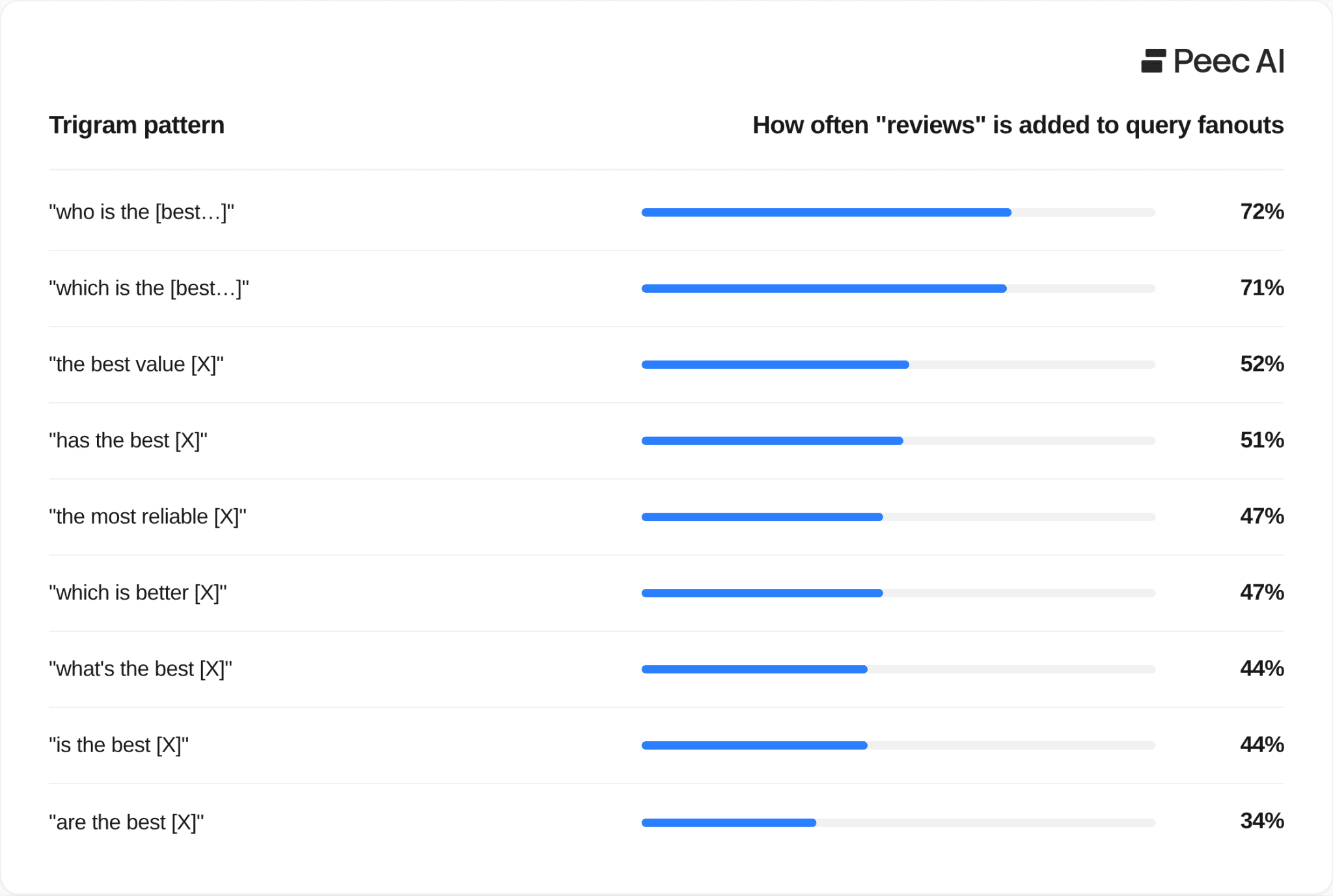
Source: Peec AI query fanout data (April 1–21, 2026)
The fact that ChatGPT hunts for reviews has real implications for SEO and GEO strategy.
First, if you're writing a "best tools" article, meet the fanouts halfway. Weave review information into your piece, summarize what users are saying, link to credible review sources, and include ratings. This makes the article more useful and more honest for readers, and it lines up with what AI search is actually looking for.
Second, if you sell a product, pay attention to how review sites portray you. In a sample project for Revolut, I found two sources driving how AI describes the brand:
Glassdoor: 4.87/5 - strongly positive
Sitejabber: 1.3/5 - a clear outlier, with several reviews that looked fake
Most teams only watch the big names like Glassdoor. However, the risk is that smaller, niche review sites slip under the radar because AI is reading those, too. If you want to learn more about it, I stressed the importance of reviews platforms in my Ultimate Guide to Tracking Brand Sentiment in LLMs.
LLMs love fresh content
ChatGPT often adds the current year to its fanout queries; it does this in 5.44% of prompts. Grok does it even more often.
The reason is simple: LLMs want to surface fresh content, and adding the year helps them find recently updated information.
Keeping your articles current pays off two-fold:
Readers trust content that's clearly up to date.
LLMs, like ChatGPT, are more likely to surface it.
For the best results, focus on updating the pages that are already influencing AI search results, rather than refreshing your whole site.
You can easily do this in Peec AI. Head over to Sources and filter by your domain. You'll see exactly which URLs from your site are already being picked up by AI search engines - those are the ones worth updating first.
How do ChatGPT query fanouts differ from fanouts from Perplexity and Grok?
The most obvious difference is volume. In our data, the three models sit at very different levels:
Perplexity (Sonar): 1.4 fanouts per query
ChatGPT: 2.1 fanouts per query
Grok: 6.8 fanouts per query (more than triple of ChatGPT)
But volume alone doesn't tell the full story. Each model has a fundamentally different strategy.
Perplexity does the least. It commonly takes your query and strips it down, removing filler words and simplifying the phrasing before running a cleaner version of the same search. Ask it "Is there a more powerful AI agent than Claude Code?" and it searches for "more powerful AI agent than Claude Code." That's it. No new angle, no added context. For anyone trying to optimize for AI search, this gives you almost nothing to work with.
ChatGPT goes further. It stays close to your original intent but injects specific brand names and product comparisons, and adds keywords like: “best”, “top” or “reviews.” "What CRM has the best support for syncing data?" becomes "CRM integration sync capabilities - Salesforce, HubSpot, Microsoft Dynamics comparison."
Grok commonly treats a query like a research brief. It starts broad, then progressively narrows down by adding year modifiers (2025, 2026), then brand-vs-brand comparisons (iPhone vs Samsung), then targeted source searches (site:reddit.com, site:g2.com OR site:capterra.com). A single query like "best dash cam" can produce 5–8 fanouts that collectively map the entire decision journey a buyer would go through.
The takeaway for optimization: Query fanouts from Grok and ChatGPT are the most useful signals for optimization purposes.
Grok's trusted sources: A window into how it researches
Grok stands out in another way: it explicitly targets the sources it trusts, using the site: operator to direct its searches at specific domains. This happens in 18.3% of all Grok chats.
Reddit is Grok's go-to source. It appears in 10.5% of all chats, and 9 out of 10 of those are site:reddit.com searches ,so it’s not just a passing mention, but a deliberate directive to pull community opinions.
Beyond Reddit, Grok's trusted source list reads like a curated index of the web's most authoritative voices by category. Wirecutter and Consumer Reports are particularly telling - 100% of their appearances were injected by Grok, but they were not a part of the initial prompt. Grok independently decided these were the right sources for product-evaluation queries.
How to find query fanouts for your own prompts
Option 1: The manual way
This method is a bit technical. To check query fanouts in a manual way you would need to open any AI search engine, pull up your browser's Network tab, and watch the requests fire as the answer loads. You'll see the fanout queries tucked inside the API calls. It works, but it's slow because you're looking at one query at a time, and you need to know what to look for. There are plenty of walkthroughs online if you want to go that route.
Option 2: Peec AI dashboard
Go to the Prompts section in your Peec AI account, pick any prompt you're tracking, and scroll down to Latest Fanout Queries. You'll see exactly what ChatGPT, Grok, and Perplexity searched for behind the scenes when that prompt ran, without needing any manual work.
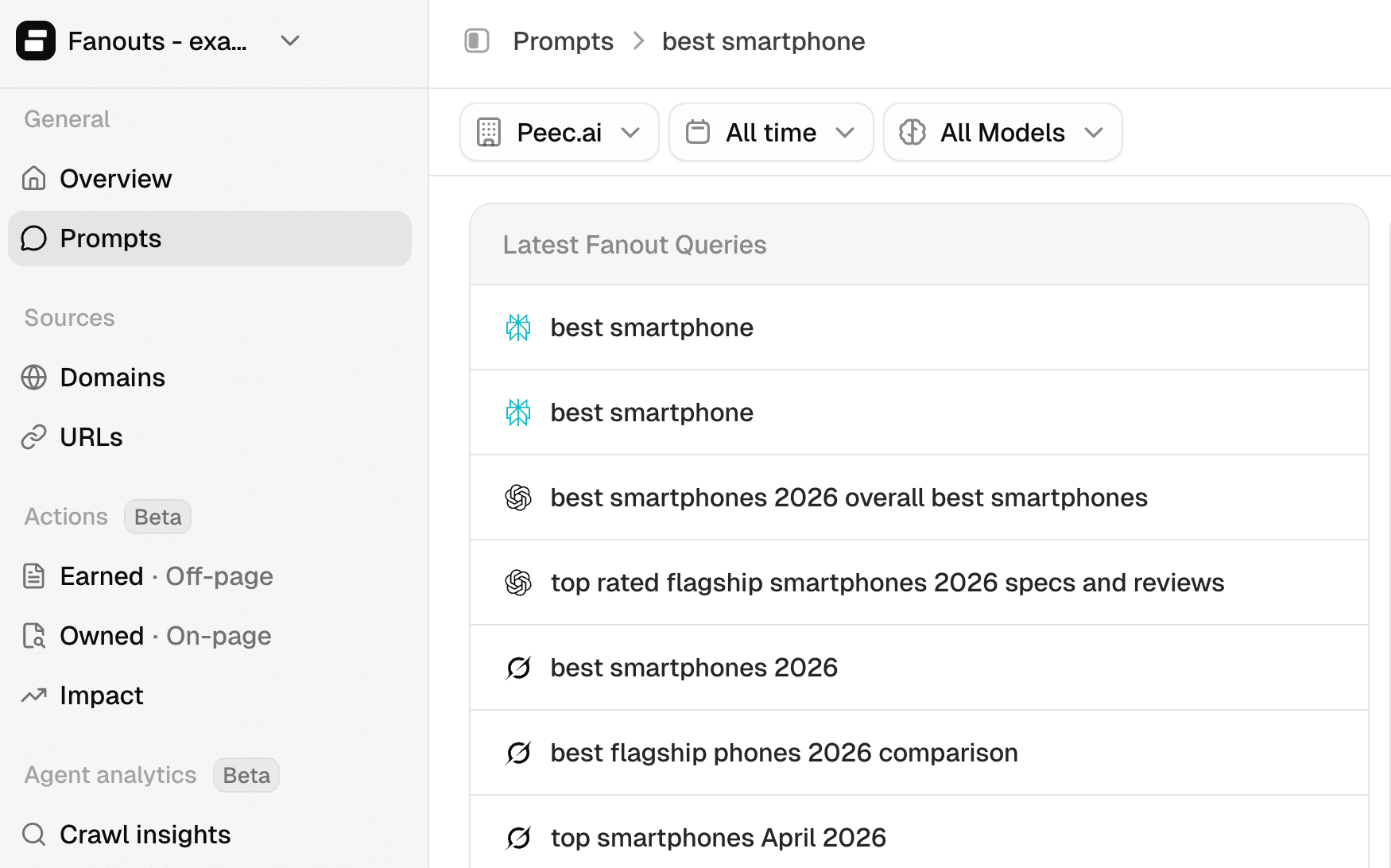
Source: Peec AI dashboard
Option 3: Using Peec AI MCP
Once you connect Peec AI MCP to your Claude, use this prompt:
Using the Peec AI MCP, pull 10 random prompts from the "[name of the project]" project that contain the word "[paste one of your topics]", just for the ChatGPT model. For each one, show me the original prompt along with a few example query fanouts. Then help me identify common themes across those fanouts about what exactly query fanouts add that wasn’t included in the initial prompt.
If you don’t use MCP yet, Peec AI is an official partner of Claude so it only takes a minute to set this up.
You can then go one step further and ask for content improvement, based on query fanouts:
Using the Peec AI MCP, pull 10 random prompts from the "[name of the project]" project that contain the word "[paste one of your topics", just for ChatGPT model. For each one, show me the original prompt along with a few example query fanouts. Then check top 2 pages of my own domain that are used as a source for these prompts, look at their content, and propose some changes based on common terms that appear in fanouts.
In my own testing this prompt delivered solid results. Personally, using Peec AI MCP and asking it for query fanouts, gave me a few solid ideas for content rewrite. Though as with any AI output, treat the suggestions as a starting point and filter them through what you already know about AI search.