
In the SEO world, analyzing server logs to inform strategy was usually reserved for technical agencies or large in-house teams. Most marketers never touched them, and for traditional search, that was rarely a problem.
AI search changes that.
Server logs are now one of the most direct ways to see why your AI search visibility is underperforming. They can show whether you're blocking key bots, or whether AI crawlers simply show little interest in your domain.
They can also expose gaps in your prompt tracking because when bots repeatedly request pages that never surface in the prompts you monitor, that's a signal to broaden your prompt coverage.
This guide walks you through which bots to watch for, how to read the data, and what to do when something looks off.
The three AI bots you need to know before reading your logs
Most discussions about AI search talk about bots as one undifferentiated group. But different AI bots do different jobs, and if you block or overlook the wrong one, you're solving the wrong problem. Understanding which type visited your site (or didn't) is what makes your server log data actionable.
1. Training bots (build the model’s core knowledge)
Example: GPTBot
An entirely new category without an equivalent in traditional search. Training bots crawl the web to collect the data used to train AI models. They don't answer users directly; instead, they build the model's underlying knowledge.
Two well-known examples of these training bots are GPTBot and Common Crawl.
Common Crawl is a free, open archive of the web. It's enormous, with over 10 petabytes of data and more than 300 billion web pages collected since 2008. Anyone can use it, and it’s proven that many major AI labs have been relying on it to help train their models.
Its big advantage is that it removes the hard engineering work of scraping the web at scale. Instead of building their own crawlers or finding ways around sites that block them, teams behind LLMs can just download data that's already been collected and packaged for them.
GPT-3, for example, was built largely on Common Crawl. Over 80% of its training data came from a filtered version of it. Many other well-known datasets are also derived from it, such as C4, which Google used to train its T5 models.
Common Crawl also tags each page with signals like PageRank and a harmonic centrality score, which help AI models quickly tell important pages from low-value ones when filtering the data.
AI models prioritize what they already know when making recommendations. Since Common Crawl serves as the foundation for major AI models, being included in their dataset is critical to ensuring your business surfaces in AI-driven searches.
If you want to see how your own site performs in Common Crawl, Peec AI GEO researcher Metehan Yesilyurt built a tool for exactly that, available at webgraph.metehan.ai.
2. Search/indexing bots (indexes your content for retrieval)
Example: OAI-SearchBot
These bots index your content so it can be retrieved and cited when an AI engine runs a search. Unlike training bots, they aren't building the model's knowledge base, and unlike retrieval bots, they aren't fetching pages for a specific user request.
They're doing the background work in advance so your content is ready to surface when a relevant query comes in. If a search indexing bot can't reach your pages, your content won't be in the pool the engine draws from regardless of its quality.
3. User query/retrieval bots (fetches pages for live requests)
Example: ChatGPT-User
These bots fetch a specific page in real time in response to a real user's request. When someone asks "Summarize this article: [your URL]" or "What does this page say?", the AI sends a request to that exact page to read and respond.
The visits are request-driven, not crawl-driven. They only happen because someone asked.
Quick reference
Bot type | Example | What it does | In short |
Training | GPTBot, CommonCrawl | Crawls broadly to collect data for model training | Shapes what the model knows by default |
Search / indexing | OAI-SearchBot | Indexes content so it can be retrieved in AI search | Determines if you can surface in AI search results |
User query / retrieval | ChatGPT-User | Fetches a specific page in real time for a user request | Triggered automatically when the model needs real-time sources to answer a user |
Why each bot type affects your visibility differently
AI models like GPT are trained on data up to a fixed point in time. They aren't continuously learning live from the web. Search and retrieval bots fill in current information, but the model's baseline knowledge (what it absorbed during training) is doing the heavy lifting on most answers.
When someone asks an AI for a recommendation, the model leans first on what it already knows. A brand that's well represented in the training data is one it recognizes and can speak to confidently. A brand that's absent isn't part of the conversation happening in the model's head, and this directly translates to lower visibility.
A live search can sometimes surface you anyway, but it's reasonable to expect that brands missing from training data get recommended less often.
There's another reason this matters: training data is only refreshed when a model is retrained, so you can’t fix gaps retroactively. Being present now is what shapes whether the next generation of models knows you.
This is why each bot type maps to a different stage of your visibility:
If training bots can't reach you, you risk you're absent from the model's baseline knowledge, the layer it draws on first and the most.
If indexing bots can't reach you, your website won't surface in AI search results.
If retrieval bots can't reach you, the AI can't read your page even when a user points it directly at your URL.
Server logs are where you confirm all three are actually happening, and where you catch the most costly problem (training access being quietly blocked) before it locks you out of the next model.
Verifying if AI search engines can freely open your website
It's crucial to understand whether AI search engines can freely access your website. If you block them, your visibility in AI search engines can suffer.
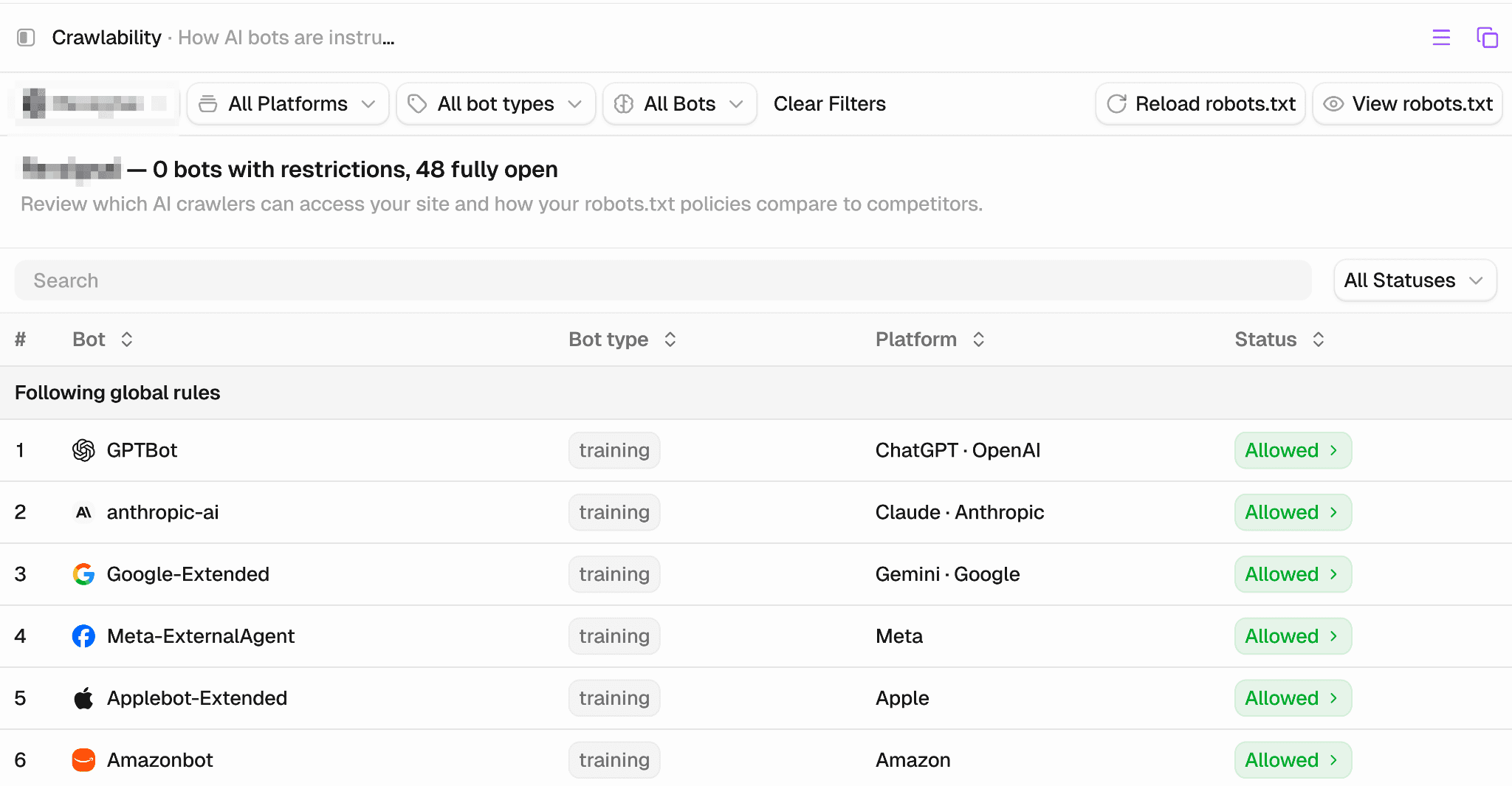
To check this in Peec AI, navigate to Agent analytics in your sidebar and click on Crawlability. There you can see a list of all blocked robots. Unless you have a specific reason to block them (for example, you don't want your data used for training purposes, or they consume too much of your server resources), you should make sure they aren't being blocked by robots.txt.
Now that you know which bots matter and why, the next step is reading the data itself and analyzing the visits AI search models actually make to your site.
Step by step: How to analyze visits from AI search models
There are two ways you can analyze server logs and visits from AI search engines, either by accessing raw data and analyzing it manually, or using specialized tools like Peec AI.
Peec AI is an AI visibility monitoring tool that analyzes AI agents behavior and gives you useful reports you can use to determine if you’re performing well, via a built-in dashboard or using an MCP.
Here’s how it works using Peec AI:
Connect your crawl data with Peec AI. It takes about 5 minutes. Here’s a tutorial covering steps needed for installation.
Go to the AI Agents page in your dashboard.
Review your statistics: Bot activity, frequency, and which pages are being hit. See below how to interpret the data.
Using Peec AI MCP to summarize your crawl data
Peec AI offers an MCP that pulls data about AI agent visits directly. To get started, connect the MCP to Claude.
From there, you can query your data conversationally. A couple of starting prompts:
Prompt 1: Get an overview of your bot activity
“Give me a summary of what bots visit my website: what types (training / search / user-query), which sections they hit and whether those pages get cited, and which bots come most often. Compare the last 7 days to the week before.”
Prompt 2: Find URLs visited by bots but appearing in citations
"Find URLs that are retrieved frequently by bots (check the Agents module for crawl data) but don't appear in citations."
A single number rarely tells you much. The real insight comes from combining how often bots request a page (from your logs) with whether that page actually shows up as a source (from your prompt/citation tracking).
When a page is requested frequently by search-oriented bots but rarely appears as a source, it’s a strong candidate for improvement because the page is being considered but not selected.
A heavily crawled, rarely cited page can point to one of three very different problems, each with a different fix:
A technical access issue: Bots can reach the page, but something blocks clean rendering or parsing, such as heavy JavaScript usage.
A content quality issue: The page is accessible but LLMs decided not to include it.
A gap in your prompt tracking: The page may actually be performing well, but you're not tracking the prompts where it would show up.
Fixing quality issues and technical issues is beyond the scope of this article. Say your "What is SEO" article gets cited often and covers topics like "What is SEO" and "top SEO agencies." Use those topics to build a list of prompts you can track. Check that each one aligns with your core business, then start tracking them.
How to read your crawl data in Peec AI
Peec AI MCP is just one way of viewing the crawl data. You can also view it in your Peec AI dashboard by navigating to the Agent analytics section in your sidebar and opening Crawl insights.
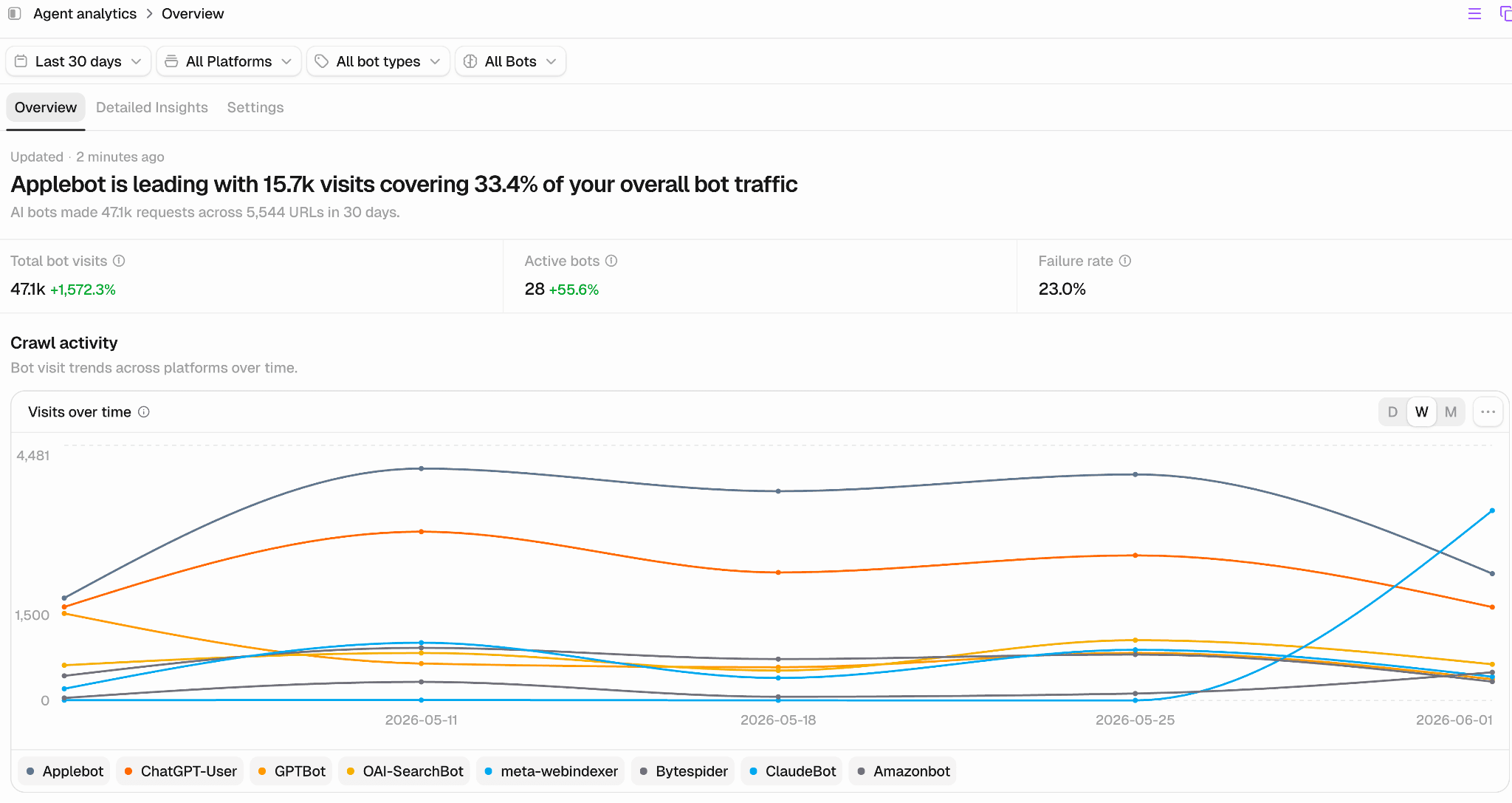
The first view you see is how often bots are visiting your website. In the example below, Applebot accounts for over 33.4% of overall bot traffic.
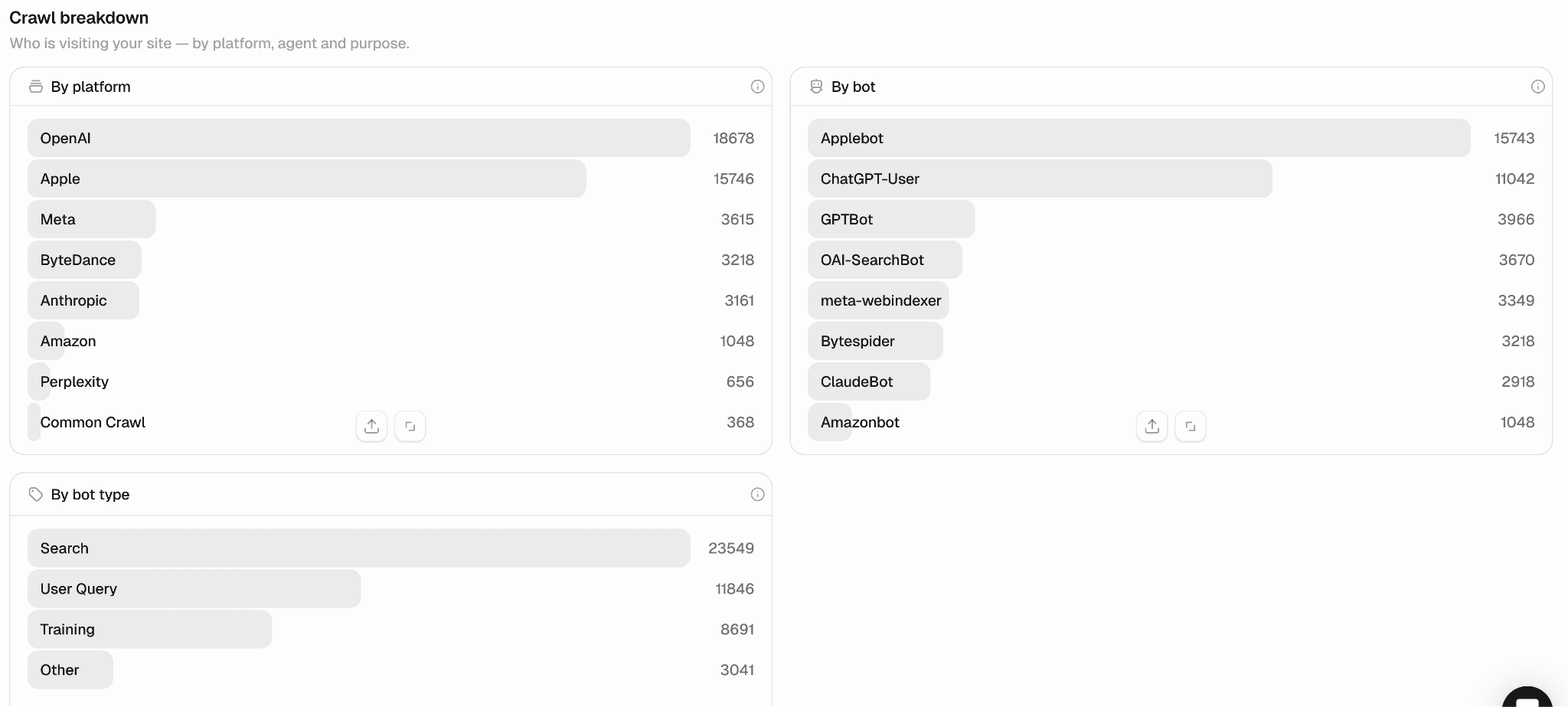
From there, you can see crawl breakdown by platform, by bot, and by bot type. In this example, search bots are the most common ones, followed by User Query and Training.
What counts as a healthy crawl mix? There's no universal benchmark, because crawl demand scales with your authority, how often you publish, and how fresh your content is. But a few signals tell you quickly whether things are on track.
1. Start with the mix, not the totals. The healthiest pattern is all three bot types showing up. Each one maps to a different stage of visibility, so seeing all three means the full pipeline is open to you:
Training bots present: Your content is eligible for the model's primary knowledge layer. This doesn’t guarantee it will be included in the final training set, but it’s an essential first step.
Search bots present: Your content is being indexed for retrieval, so it can surface in AI search results.
User-query bots present: Real users are pointing AI directly at your pages. This is often the highest-intent signal of the three, because it only happens when someone asks.
2. Check where they land, not just how often. If bots only ever hit your homepage and a handful of top-level pages, your deeper content may be invisible to them. This is usually a crawl depth or internal linking issue rather than a blocking one. The pages you most want cited should be among the pages bots actually request. If a page never shows up in your logs at all, no amount of content tuning will help because the bot never sees it in the first place.
Bringing it together
Prompt tracking tells you whether you're showing up in AI search and where. Server logs add one more layer to look at when the results don't add up because they show whether bot access is part of the problem.
Access is worth ruling out first, because it makes everything else irrelevant. A page no AI search bot can reach won’t surface, no matter how strong it is. Logs also point to a second factor. Pages crawled often but rarely cited suggest the content is being considered but not chosen, which points either to prompt fit or to a gap in what you're tracking.
What logs won't tell you is whether the content itself is good enough, or whether your domain carries enough authority to be picked. Those still need their own assessment. But logs narrow the field fast: they confirm access is open, and flag the pages worth a closer look.
Here’s what to check, in order:
Crawlability first. Make sure you're not blocking bots you actually need. A bot blocked in robots.txt can't help you, no matter how good the page is.
All three bot types are present. Training, search, and user-query bots each map to a different stage of visibility. A missing type tells you where the gap is: absent from the model's knowledge, not indexed for retrieval, or never pointed at by real users.
Crawls against citations. Pages hit often but rarely cited are your highest-value candidates. The engine is considering them but not choosing them.
Agent log analysis used to be a technical niche. Now it’s a standard layer of AI visibility work, and a good place to confirm the pipeline is open before you spend time tuning anything downstream.