
Most of what gets said about how ChatGPT "reads" a website is guesswork from the outside. But ChatGPT's Deep Research isn't a black box. While it works, it narrates the entire session back to the client over a WebSocket connection: every search query, every page it opens, the raw text it pulls off each page, and its private chain of thought. Record that connection in your browser's DevTools and you can see exactly what the agent did, and why. That makes it possible, for the first time, to look at your site the way Deep Research sees it and understand exactly what's costing you reads and citations.
One scoping note before we start: this is about Deep Research specifically, the long-running agent that reads through a text browser. It is not ChatGPT's quick Search answer, and not Agent mode (which drives a real, clicking browser). Everything below describes the text-browser pipeline Deep Research uses.
TL;DR
Here is how ChatGPT Deep Research reads a page:
It gathers information in three steps: read Bing snippets → open a page and skim → read deeper.
It runs on three browser commands (
search,open,find) and never clicks (in Deep Research's text browser).Each
openreturns a capped window of text (~5–6k characters). Links at the top of a page spend that budget, so navigation can crowd out your content.Bing snippets are short (~285 characters max), which is about all the space you get to earn the open.
The most common re-read trigger is a keyword
find: the agent re-opens a page positioned on the line afindmatched, 95% of the time in our sample.It follows links, including your internal ones, to find what a page didn't say.
It reads your image alt text as plain content, and skips images that have none.
topncontrols search depth (results per query), which is distinct from query fan-out, the breadth (how many queries).It reads far more than it cites (being read is not being cited).
Its domain trust judgments are visible in the logs, and several kinds of content are simply blocked or unreadable.
Methodology: How we recorded this
That WebSocket stream is exactly what the ChatGPT UI renders as the live "Researching…" panel. It is also fully recordable, which is what this whole study is built on.
One search, in the raw stream
A single browser.search call as it arrives over the WebSocket: the query Deep Research generated, its topn and source, and the Bing SERP list it got back.
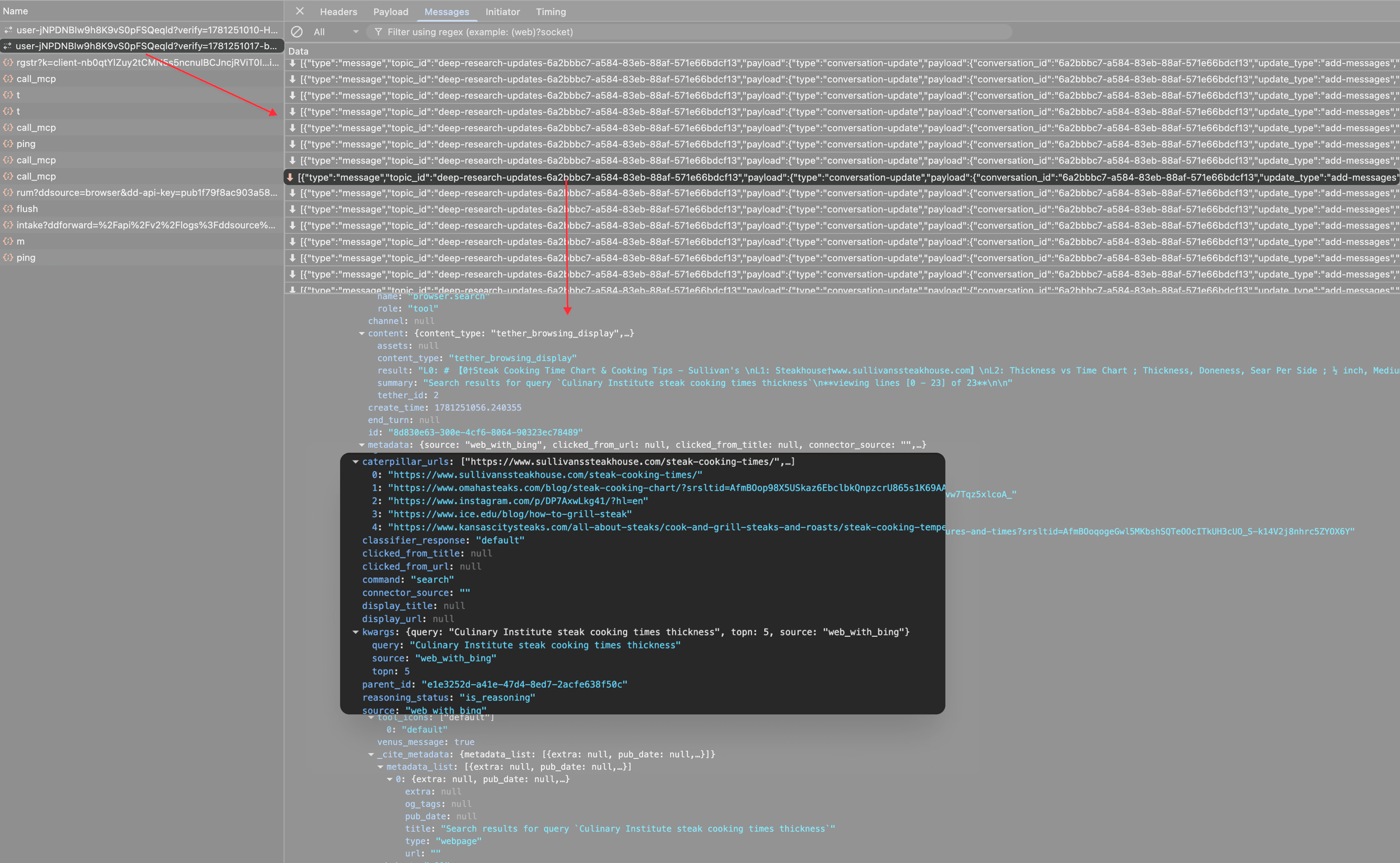
The query Deep Research generated (the QFO) and the ranked Bing SERP list it returned: exactly the data the agent sees. Source: Peec AI · Deep Research session logs.
Capturing the stream is timing-sensitive. The WebSocket is opened the moment a Deep Research run starts, and it only logs the frames it receives after you are listening. So the browser’s DevTools have to be open before you hit start (on the Network tab, filtered to WS), and you have to click the right WebSocket connection quickly to attach to it and capture the full session.
The WebSocket only logs frames received after you start listening, so opening DevTools after launching a run means losing the opening searches. Once we were attached cleanly, we downloaded the raw frames to a file and analysed them offline, which is far easier than scrolling a live, still-growing stream in the DevTools panel.
The sample. We did not rely on a single session. We ran Deep Research across more than 10 separate accounts, with about 20 requests each (every account logged in on the free, unpaid tier), and deliberately mixed informational prompts (research, planning) with transactional ones (product and provider comparisons). We only treated something as a finding when it repeated across accounts and prompt types, not when it showed up in one lucky run.
How we structured the sample
We did not rely on a single session. We ran Deep Research across more than 10 separate accounts, with about 20 requests each (every account logged in on the free, unpaid tier), and deliberately mixed informational prompts (research, planning) with transactional ones (product and provider comparisons). We only treated something as a finding when it repeated across accounts and prompt types, not when it showed up in one run.
How we know the read is faithful
To verify the read is faithful to the actual page and not a lossy summary, we fetched a sample of the same URL ourselves using a plain, no-JavaScript request (the same kind of fetch the text browser makes) and converted the HTML to text in source order. The agent's read and our crawl line up word for word.
Nothing is dropped or rewritten, and nothing JavaScript-rendered sneaks in. The body is also linearized strictly top to bottom, with the <head> discarded, so what fits in the first read is determined by where your content sits in the HTML source, not where it appears on the screen. A navigation menu that CSS renders at the top but sits late in the source costs you nothing. An answer buried behind a large navigation block in the source may never appear in the first read at all, regardless of how prominent it looks visually.
The two reads side by side show just how literal this is.
The read is just your HTML, linearized
We crawled the same page ourselves with a plain, no-JavaScript request and converted the HTML to text. Deep Research's WebSocket read and our crawl are the same text, in the same source order.
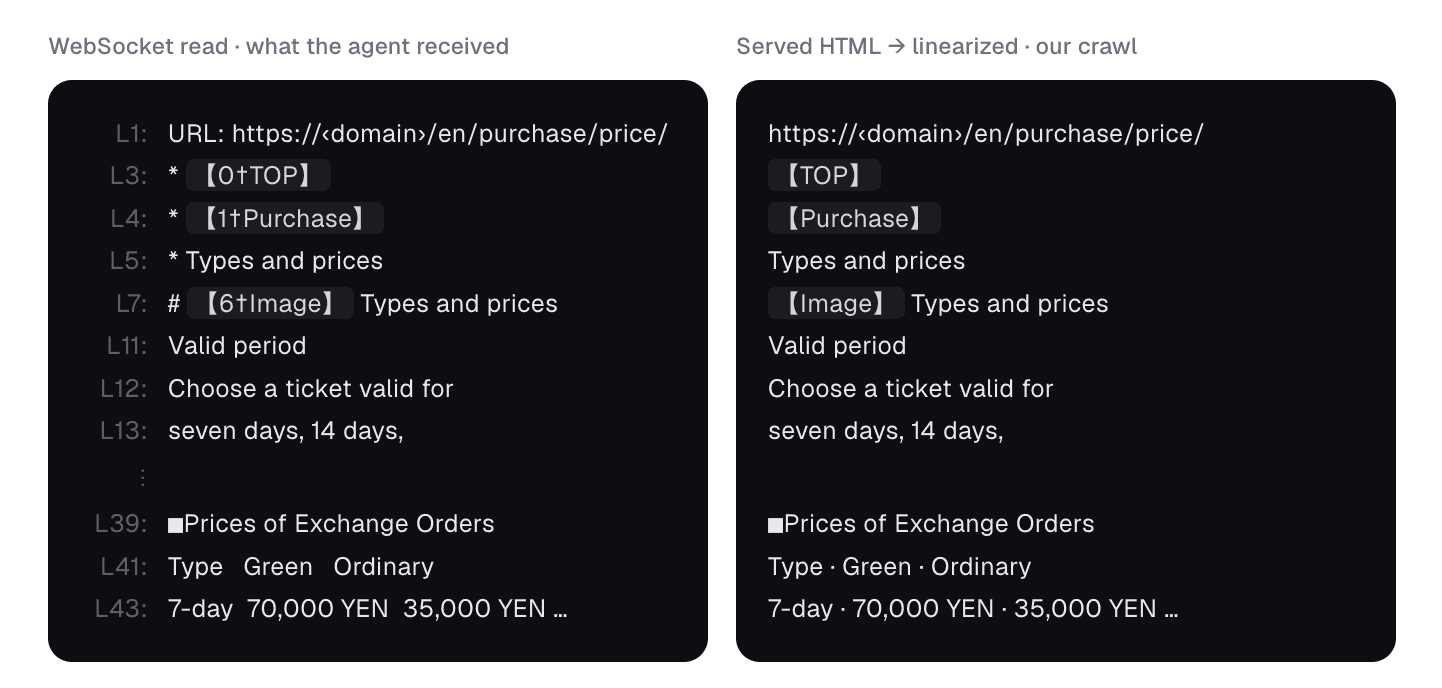
Same page, two sources. The only differences are cosmetic: Deep Research numbers each line (L1, L3…) and renders every link as a 【n†anchor†url】 marker; our raw crawl shows the same anchors without the numbering. Nothing in the read is missing from the HTML, and nothing appears that isn't in the served source: it is the body linearized top to bottom, with the <head> stripped. Source order is what fills the budget, not on-screen position.
How to read the numbers that follow
This is observational research on a moving target: OpenAI iterates on Deep Research constantly. So treat the mechanics as the durable finding and any exact figures as a snapshot (June 2026). Where we quote the agent, the text is verbatim from the logs.
How Deep Research gets its information
Every session is built from three browser actions, and ChatGPT Deep Research moves through them in a clear pipeline using three commands.
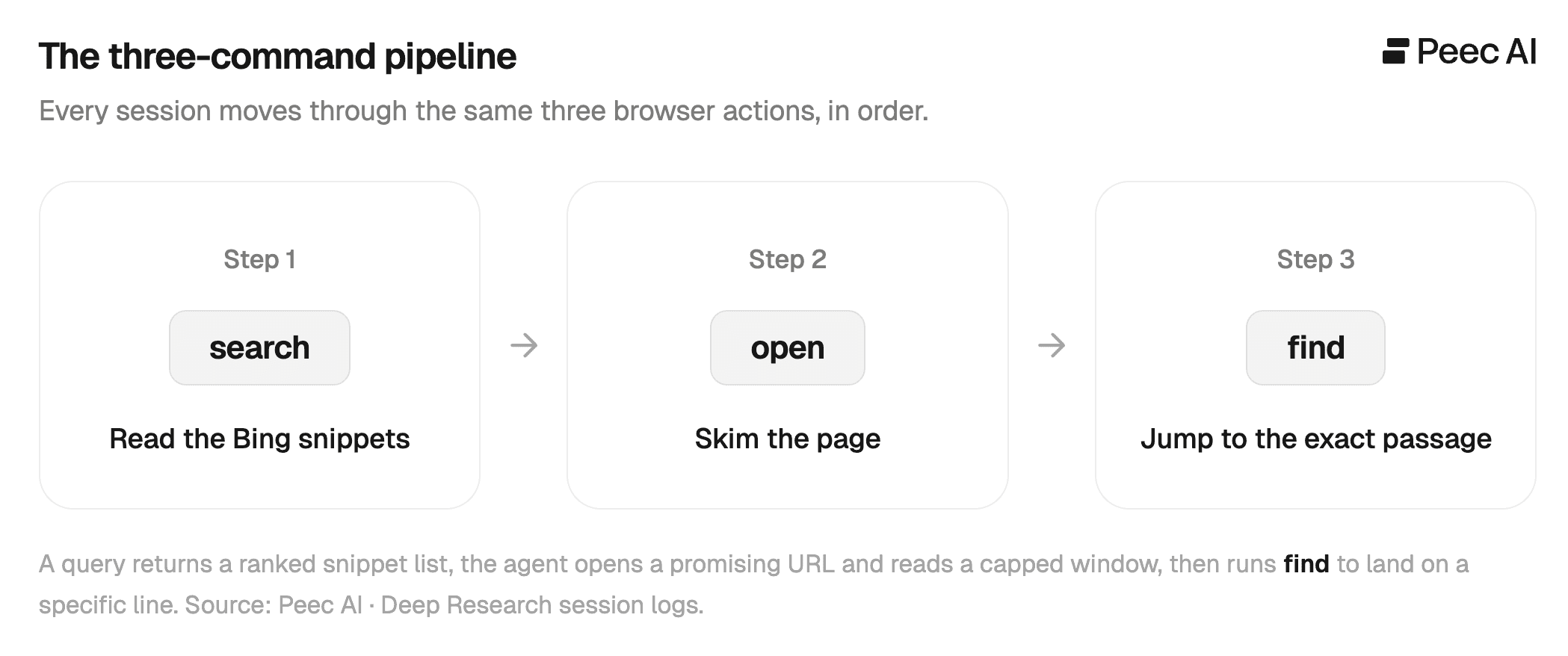
Step 1. search: read the Bing snippets
A query goes out and comes back as a ranked list of results, each rendered as its title, URL and a short snippet:
This is the first filter. If your snippet doesn't earn the open, the agent never sees your page.
Every search payload carries "source":"web_with_bing", so the retrieval index is Bing, not Google. More on that below.
Step 2. open: skim the page
The agent opens a promising URL and gets the page back as plaintext, numbered line by line. It reads a window (the first chunk of those numbered lines), decides if the page is worth more, and only then keeps going.
Step 3. find: jump to the exact passage
When it needs a specific detail, it runs find, a Ctrl+F inside the already-open page, which returns the exact line numbers of the match. It then re-opens the page positioned on those lines.
There is a fourth command it could use, click, and across every session we logged it was used zero times. Deep Research's text browser can't expand an accordion, apply a filter, or trigger anything that needs JavaScript.
If the only path to your content is a click, that content doesn't exist for the agent. This hits client-rendered SPAs and JS-gated content hardest: if it isn't in the served HTML, it isn't read.
How much text each step actually returns
Each step hands the model a very different amount of text, measured in characters of the returned block:
Read step | Median chars | Max | What you control |
|---|---|---|---|
Bing snippet (per result) | ~250 | ~285 | your snippet (Bing may rewrite it) |
Bing result list (per search) | ~740 | ~2,600 | n/a |
First open of a page | ~5,700 | ~8,000 | your first screen of content |
Re-read of the same page | ~6,200 | ~8,400 | a deeper section |
| ~435 | ~4,800 | the matched passage |
| ~49 | ~67 | (just a "not found" message) |
The Bing snippet caps at about 285 characters, which is the entire window you have to earn the open. And a find miss returns only around 49 characters, so the agent can probe pages keyword after keyword at almost no cost.
What triggers a re-read
When the agent wants more of a page it already opened, it runs open on that same page again, getting back another capped window of numbered lines starting deeper in the page. That next ~5–6k-character slice is what we call a re-read. A find works differently. It returns only the line numbers where a search term appears, which the agent then uses to decide where to re-read.
A re-read isn't random, it's mostly keyword-driven. The single biggest trigger is a successful find: the agent searches the open page for a term, gets back the exact line numbers, then re-opens the page positioned on those lines, not from the top. In our sample, when a find triggered the re-read, its window contained the matched line 95% of the time:
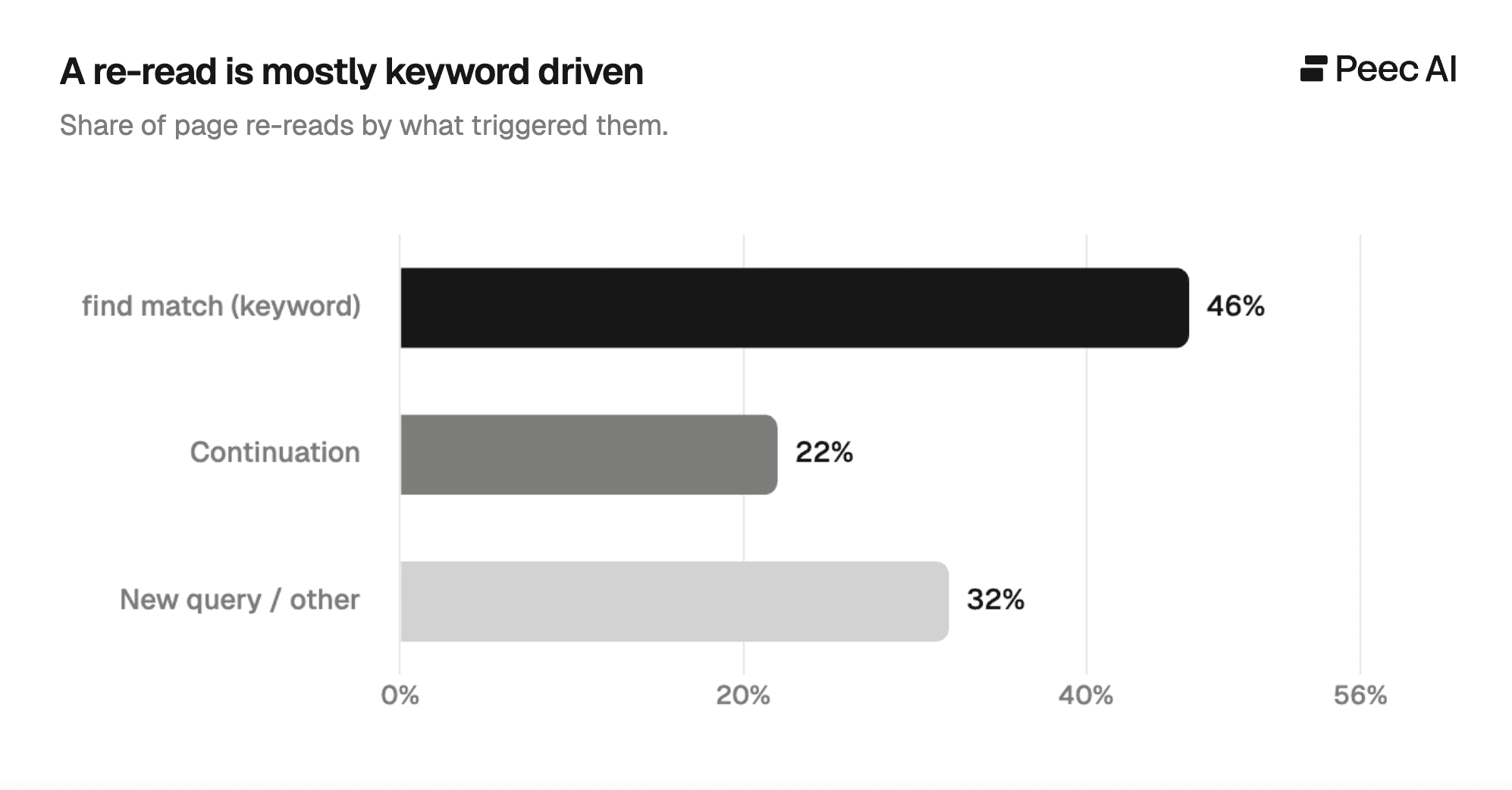
The second trigger is plain continuation (about one in five re-reads) without a keyword. The agent just reads the next chunk because it judged the page worth more. What you almost never see is a re-read of a page the agent skimmed once and dismissed, so a re-read is a signal the page earned a second look.
And when a find misses (the term isn't on the page) the agent usually tries a different keyword (~60% of the time), but roughly a quarter of the time it abandons the page and fires a fresh Bing query. Pages that don't contain the expected keywords are abandoned quickly.
The reading budget: Why your navigation costs you
Each open returns only a capped window of text, roughly 5–6k characters, never the whole page (see the table above). Whatever fits in that window is what the agent sees before it decides whether to keep going. We call that first window the first read.
And every link on the page is rendered inline as a link marker: a tag like 【47†Lenovo Yoga 7 2-in-1 (2024)†url】 that Deep Research turns every link into. Each marker spends characters from that same window. But how much of that first read is your content, and how much is navigation?
We measured it across the pages Deep Research opened, grouping each first read by how many link markers it carried:
Light navigation (under 20 links): About 78% of the first read is your real content.
Medium (20–59 links): About 55%. Already nearly half the read goes to navigation and markup, and this is where most pages sit.
Heavy navigation (60+ links): Only about 33%. On these pages two-thirds of the read is menus and links before the agent reaches your answer.
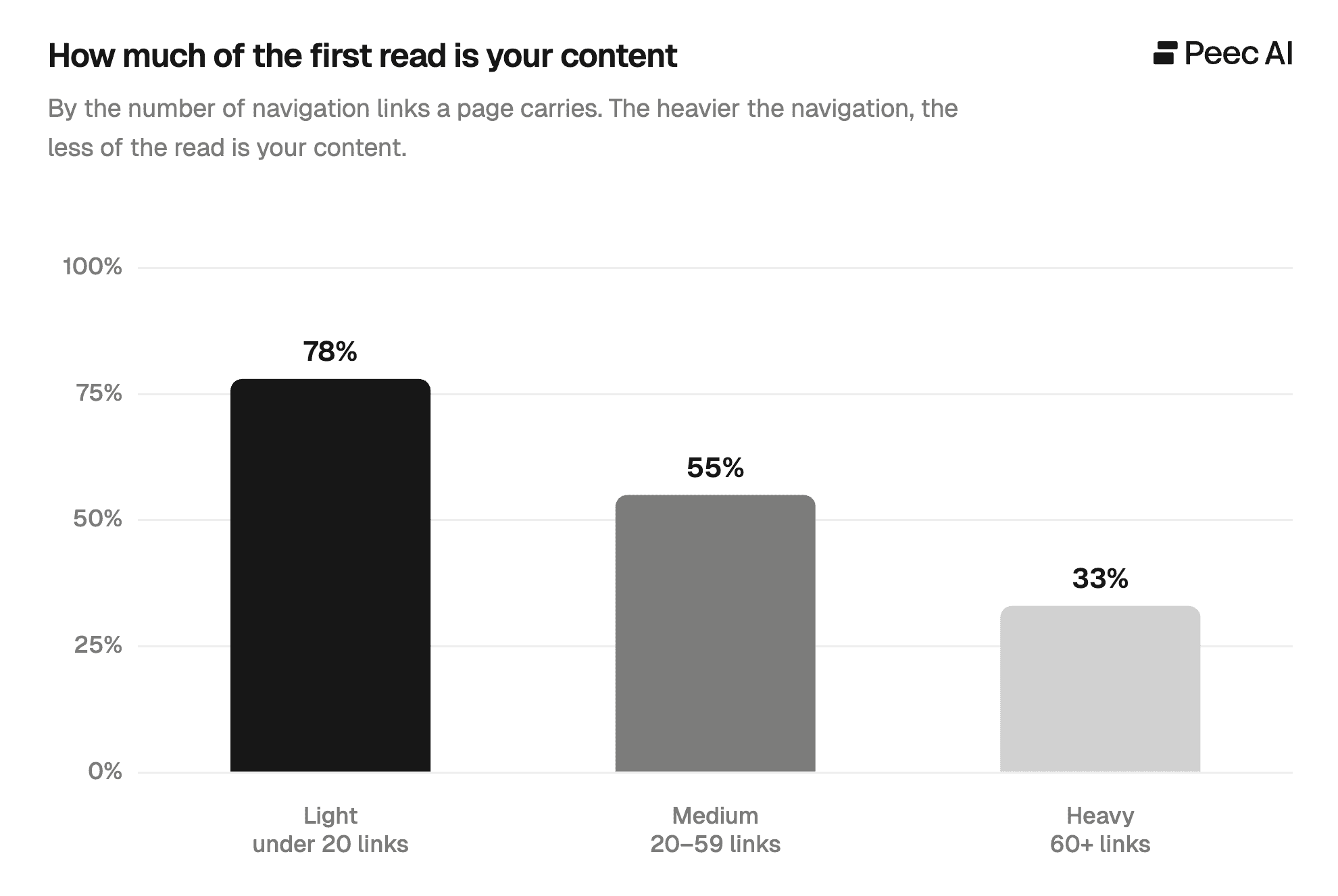
Almost every real page carries some navigation (a typical first read held around 50 link markers). What matters is how much of it appears in the HTML source before your content does. And it isn't only "related"-link blocks: every HTML page opens with its URL and its header chrome first.
A real first read of a consumer-reviews page shows how quickly navigation consumes the budget. The opening lines are the URL, a skip link, and then the entire top menu, with no review content in sight yet:
The "skip to content" paradox
Line 3 shows "Skip to main content." That link exists precisely to jump past the menu, and on most sites it's the very first element on the page. So shouldn't the agent just skip the navigation?
The reason comes down to two of our findings. "Skip to content" is an accessibility shortcut for humans: a link a keyboard or screen-reader user activates to leap straight to the body. Activating it requires a click, and Deep Research never clicks. The agent reads the words "Skip to main content" as just another line of text, then keeps reading straight down ("Back," "My saved items," "Menu," "Log in," the whole account menu) before it ever reaches your content.
So when a page leads with a heavy navigation bar, mega-menu, and skip links, the agent spends its first read on menus and headers rather than your actual answer, and may decide the page isn't worth more before it reaches your content.
Links take reading capacity away from your content. The one PDF we opened was the clean exception. It started at line 0 straight into the document text, **viewing pdf page 1 of 3**, with none of the chrome that HTML carries.
The practical fix is to put your main answer in the first screen of your HTML, written as plain text, so it lands inside that first ~5–6k-character read. Keep the top of the page light with a slim header, and no mega-menu or long link list before the content begins.
If your answer currently sits below a heavy navigation block, move it up in the source order (or move the navigation down), so the agent reaches it on the first read instead of spending the budget on menus.
Deep Research follows your links
This is the behavior that surprised people most. Deep Research doesn't treat a page as a dead end. It reads the links on the page and selectively follows the ones it judges relevant, including your internal links, rather than crawling your whole site.
In the read text, every link appears as a link marker (the 【…†url】 tag again) exposing both the anchor text and the destination URL: 【n†See plans & pricing†/pricing】. The agent can see exactly where each link goes, and you can watch it decide to follow one, in its own reasoning:
"I see that there's a navigation line with a 'Pricing' link… I'll click on 'Pricing' to dig further."
"It looks like the page might be related to the person I'm researching. I'll click the link to check."
"Click" is just its word for opening the href: it reads the URL from the marker, it doesn't interact with the DOM. It then reads the linked page through the same pipeline. Descriptive internal links with clear anchor text pointing at your pricing, spec and comparison pages give Deep Research a direct route to your deeper content. Anything hidden behind a script-driven menu is simply unreachable.
Below, each browser.open call records the page the agent jumped from, showing exactly when an internal link pulled it deeper into a site.
Following a link, logged
A browser.open call whose metadata names the page it came from: the agent reached this page by following a link, not from a search result.
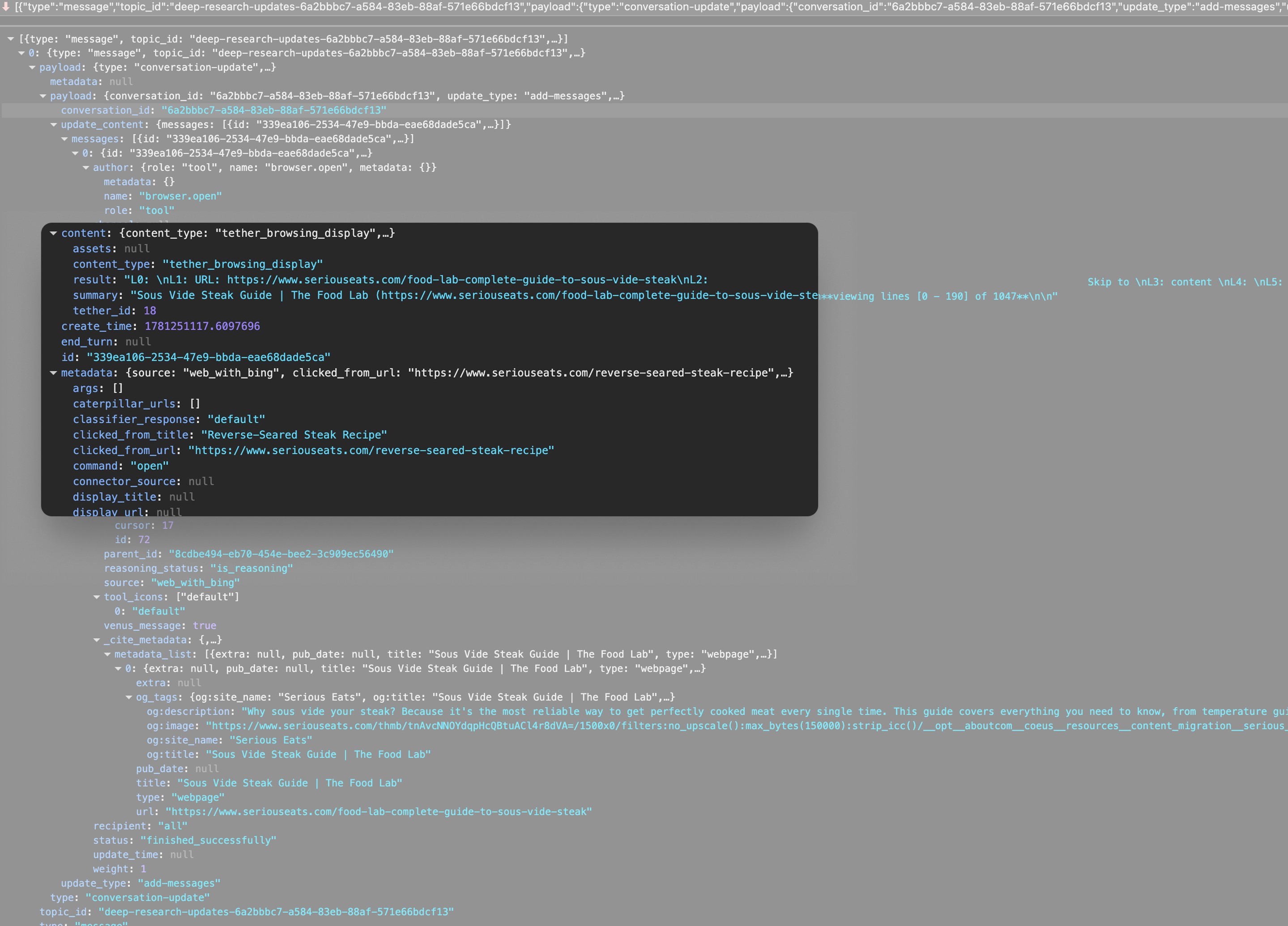
clicked_from_url and clicked_from_title record the page the agent jumped from, which is how internal links pull it deeper into a site. Source: Peec AI · Deep Research session logs.
Search depth, not breadth: The topn value
Fan-out is breadth: the set of distinct, reformulated sub-queries the agent issues to cover a topic. topn is depth: a parameter on each individual search that sets how many results that one query returns. This section is about the second.
topn isn't fixed. It varies across a session and, based on a consistent pattern in our logs rather than any documented setting, behaves like a confidence dial:
High
topn(up to 10) on opening, exploratory queries, casting wide when it doesn't yet know the landscape.topn=3as the steady-state default once it has its bearings.topn=2when it's verifying a specific fact it already expects to confirm.
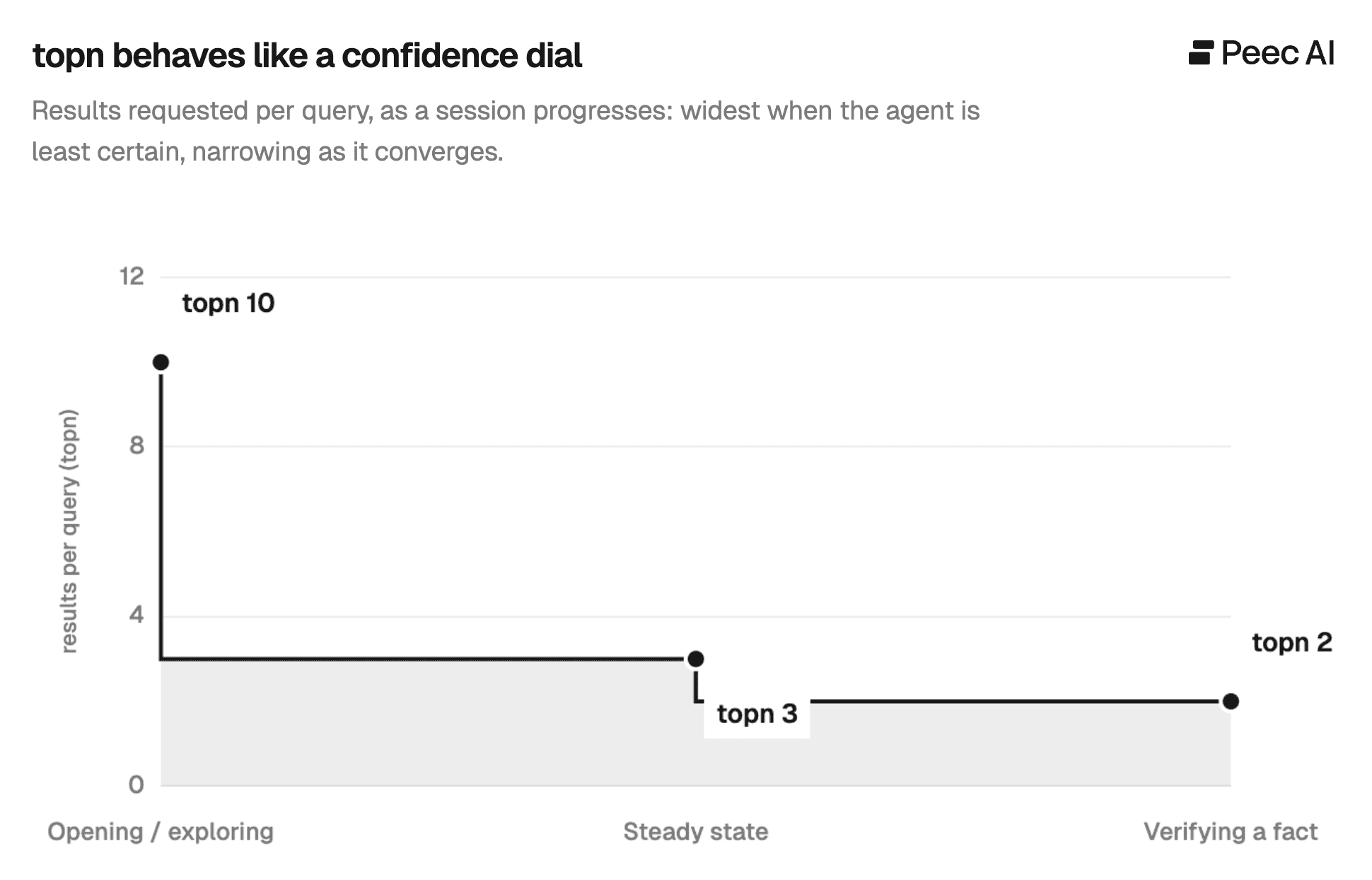
Depth is widest when the agent is least certain and narrows as it converges. By the time Deep Research is confident, it's pulling only the top two or three Bing results per query. If you're not in that top handful for the queries that matter, you're not in the set it reads from.
Deep Research reads your alt text
Deep Research doesn't process images visually, but image alt text is rendered directly into the page text it reads. Every image comes through as a marker carrying its alt attribute:
That text is treated as content. On a transactional comparison task, the agent lifted a rating straight from an image's alt text and acted on it:
"The image alt text mentions 'Defaqto 5-star' and 'Which? Recommended Provider…'. I'll note these details and verify their accuracy."
The flip side is just as important. When an image has no meaningful alt text, it's near-worthless, and the agent reads the filename and gives up:
"It seems to be a vector graphic ('awardwinning-360x140.svg') rather than a useful image with alt text… likely just decorative, so I'll skip it."
So a badge, chart or award graphic with rich alt text can put a fact into the answer, while the same image with alt="" or a meaningless filename is invisible. Alt text isn't an accessibility afterthought here. In this pipeline, it's the only thing the agent can read from an image.
Being read is not the same as being cited
One nuance that matters for anyone measuring AI visibility: the agent reads far more pages than it cites. Reading builds its understanding; citing is a separate decision it makes later, and often declines:
"It looks like the site doesn't have specific content to cite for closures, so I'll rely on general knowledge, as no citation is required here."
Your page can shape the answer without ever appearing as a source. If you track citations alone, you undercount your real influence, and getting opened is necessary but not sufficient. To be cited, you have to be the specific, non-obvious source for a claim the agent decides actually needs backing.
This gap between being read and being cited is exactly what the agent analytics in Peec AI are built to surface. You can see which of your pages AI agents actually reach, what they take from them, and where they stop short of citing you.
How the agent judges source trust
Because the logs include the reasoning, you can watch the agent grade a source's credibility before it even reads it, and it telegraphs the verdict with a consistent vocabulary.
Positive signals cluster around words like official, reliable, trusted, credible, reputable, well-known. It reaches for "official sources… for credibility," and treats recognized rating and reference sites as load-bearing.
Negative or hedging signals sound like "not an official source," "anecdotal," "might not be reliable," "decorative." User-generated and forum content is treated as background context rather than primary evidence. Unofficial aggregators fare only slightly better, kept at most as useful general information.
The pattern mirrors E-E-A-T, narrated in real time through the agent's reasoning rather than applied as a numeric score. If your category has an obvious official or authoritative source, the agent reaches for it first. The implication is to be that source, or to earn citations from it.
What Deep Research can't read: Blocked and unreadable content
Plenty of content never makes it in, and the logs show several distinct failure modes:
robots.txtblocks. Opening certain pages returnsL0: Fetch denied by robots.txt (OAI-SearchBot)andviewing lines [0 - 0] of 0, meaning zero content. Note the user-agent:OAI-SearchBotis the one Deep Research's fetch obeys. (It's a different bot fromGPTBot, which is about model training, so unblocking one doesn't change the other.) Even a major professional network gets dropped this way.Social platforms behind login walls. "Access is blocked" on the big social networks; the agent can, at best, scrape a caption out of a Bing snippet.
Large marketplaces. "Finding direct listings… might be tricky, possibly blocked": some commercial sites refuse the fetch.
Timeouts. "Direct requests timed out, possibly blocked": slow or defensive servers drop out of consideration.
Images without alt text, read as an empty
Imagemarker and skipped as decorative.
None of these failures are flagged. The final report simply arrives without whatever those sources would have contributed.
A note on "it's all Bing"
Every search we logged ran on Bing (web_with_bing), with no Google and no fallback. That's specific for ChatGPT's retrieval, not for AI search as a whole. Google's own surfaces (AI Overviews, Gemini) run on Google's index. A page that ranks well on Google usually ranks decently on Bing too, because the two indexes tend to reward similar things, though it isn't guaranteed. The takeaway isn't to deprioritize Google, but to treat Bing visibility as a distinct lever. Most teams aren't watching it, and for ChatGPT it's the only one that counts.
How to get more of your page read (and cited)
If you do nothing else, do these three:
Start by unblocking
OAI-SearchBotinrobots.txtand at your CDN/WAF. Blocked means invisible.Front-load the answer in plain text near the top, and slim the navigation so your content isn't pushed out of the ~5–6k-character first read.
Use the exact words people search, verbatim, in your headings and copy. A re-read fires when
findmatches a keyword; if the term isn't literally on the page, the agent moves on.
Then, when you have more time:
Treat Bing as its own channel. For ChatGPT, only the top 2–3 Bing results per query make the set it reads from.
Earn the open with your snippet. You get ~285 characters in Bing's results (which Bing may rewrite); make them answer the query, not just carry your brand.
Make the answer text, not interaction. Nothing critical behind clicks, filters, tabs or client-side rendering.
Use descriptive internal links with clear anchor text; the agent follows them to your deeper pages.
Write real alt text on every meaningful image. It's how facts travel from your graphics into the answer.
Earn the "official source" frame with citations, named authors, and recognized third-party validation.
Measure influence, not just citations. The agent reads far more than it cites, so a citation count undercounts your real impact on the answer.
What this does and doesn't prove
This is observational research, not a controlled experiment, and Deep Research is constantly evolving. The mechanics (Bing retrieval, three commands, no clicks, a capped read window, robots.txt enforcement, alt-text-as-text, link-following) are structural and have held consistently.
The exact numbers (the ~5–6k window, the ~285-char snippet, the 95% re-read alignment, the topn thresholds) are measurements from a snapshot and will drift as OpenAI iterates. The reasoning quotes reflect the model's stated logic rather than a guaranteed mechanism. They show how the agent narrates its own intent, which is the best evidence we have, but not a controlled proof of behavior.
You can't optimize for an agent you can't observe. But Deep Research isn't unobservable, and now neither is the gap between your content and the answer.
Want to see where your brand shows up across ChatGPT, Google AI Mode, Perplexity and the rest, and which sources feed those answers? That's what Peec AI tracks, including agent analytics that show how AI agents read and cite your pages. Start a free trial and find your highest-opportunity gaps.